

Docs directory
Table of contents
MicoAir405v2 User Manual
Product Overview
MicoAir405v2 is a general-purpose flight controller for small and medium-sized drones and multirotor platforms. It uses an STM32F405 MCU and integrates a high-performance BMI088 IMU, SPL06 barometer, analog-video OSD, microSD card slot, and a comprehensive set of UART and PWM resources. It runs ArduPilot and INAV and is suitable for projects that require analog video, multiple peripheral interfaces, and a compact 30.5 × 30.5 mm mounting pattern.
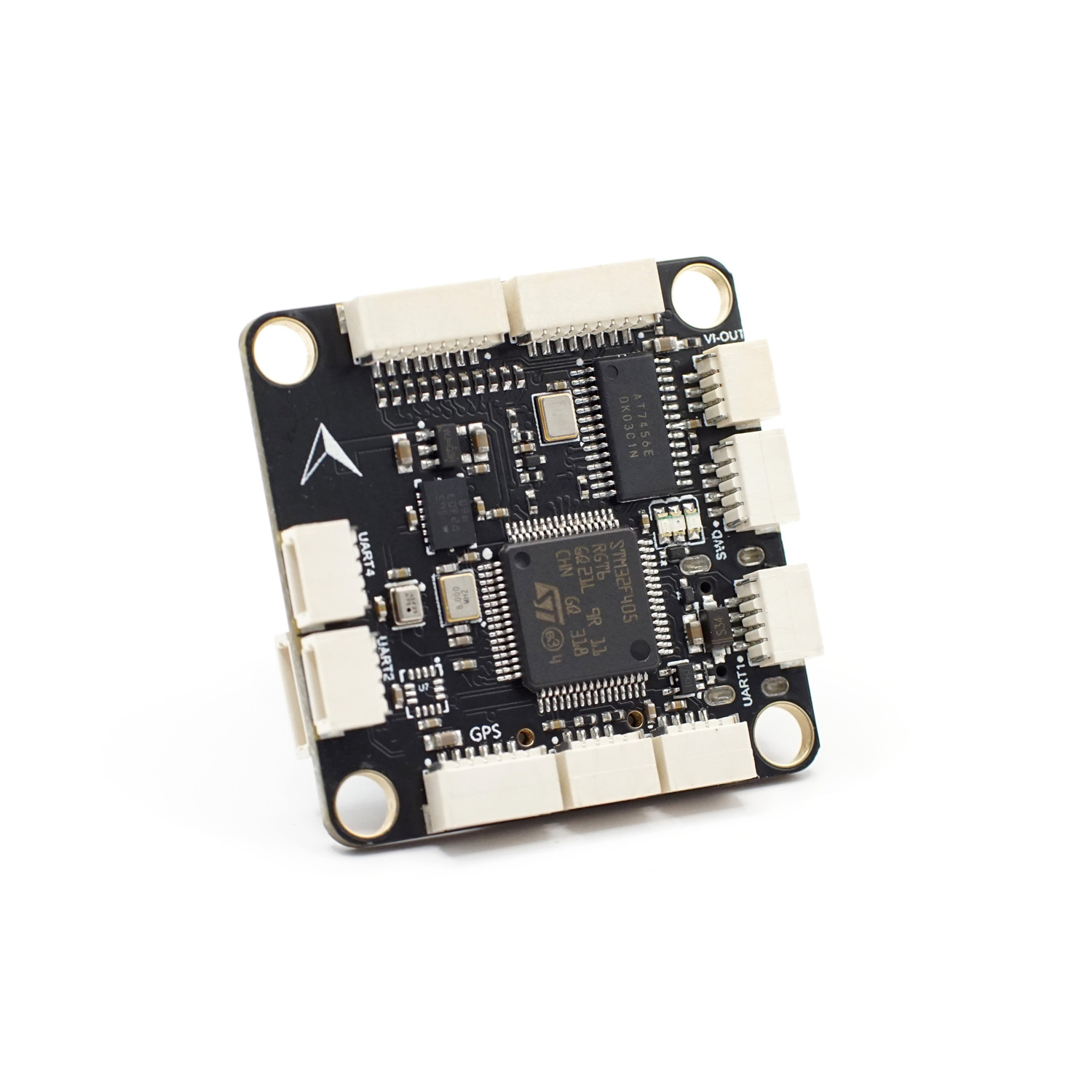
Key Features
| Item | Specification |
|---|---|
| MCU | STM32F405RGT6, 168 MHz, 1 MB Flash |
| IMU | BMI088 |
| Barometer | SPL06 |
| Analog OSD | AT7456E |
| Data logging | microSD card slot |
| UART | 6 UARTs |
| Motor / servo outputs | 10 PWM outputs |
| Expansion buses | 1 × I²C, 1 × SWD |
| Analog inputs | 2 ADC inputs for voltage and current monitoring |
| USB | USB Type-C |
| Regulated outputs | 5 V / 3 A, 9 V / 3 A |
| Firmware support | ArduPilot 4.5.0 and later; INAV 8.0.0 and later |
| Mounting-hole pattern | 30.5 × 30.5 mm, approximately 4 mm hole diameter |
| Dimensions | Approximately 36 × 36 × 8 mm |
| Weight | Approximately 9 g |
Purchase
Hardware Specifications
Processor and Sensors
MicoAir405v2 uses an STM32F405RGT6 MCU. The BMI088 measures acceleration and angular velocity, while the SPL06 provides barometric altitude data. The flight controller has no onboard magnetometer. If heading data is required, connect a GPS with an integrated magnetometer or a separate compass to the external I²C interface.
Interfaces and Outputs
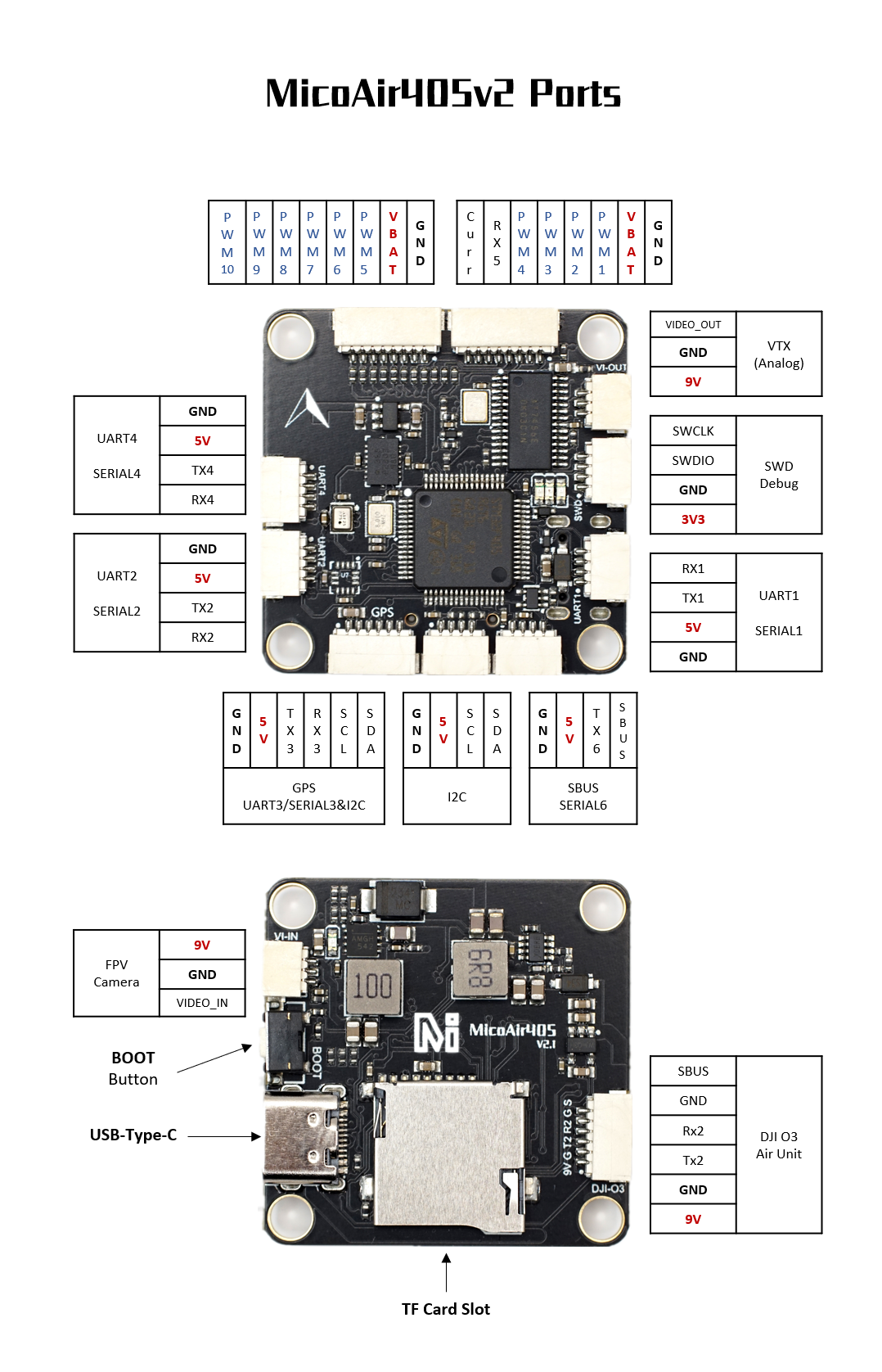
- Six UARTs for peripherals such as GPS, telemetry radios, RC receivers, digital video transmitters, and ESC telemetry.
- Ten PWM outputs, with outputs 1–8 suitable for motors or servos.
- One external I²C bus for compatible sensors such as magnetometers and airspeed sensors.
- One SWD interface for low-level debugging and recovery.
- Two ADC inputs for battery-voltage and current sensing.
- AT7456E analog OSD for overlaying flight information on an analog-video feed.
- microSD card slot for flight-log storage.
Power and Mechanical Design
The flight controller provides regulated 5 V / 3 A and 9 V / 3 A outputs.
Distinguish carefully between
5V,9V, andVBAT. Connecting battery voltage to a 5 V input, or connecting the 9 V output to a receiver rated only for 5 V, may damage the device immediately.
Dimensions and Installation
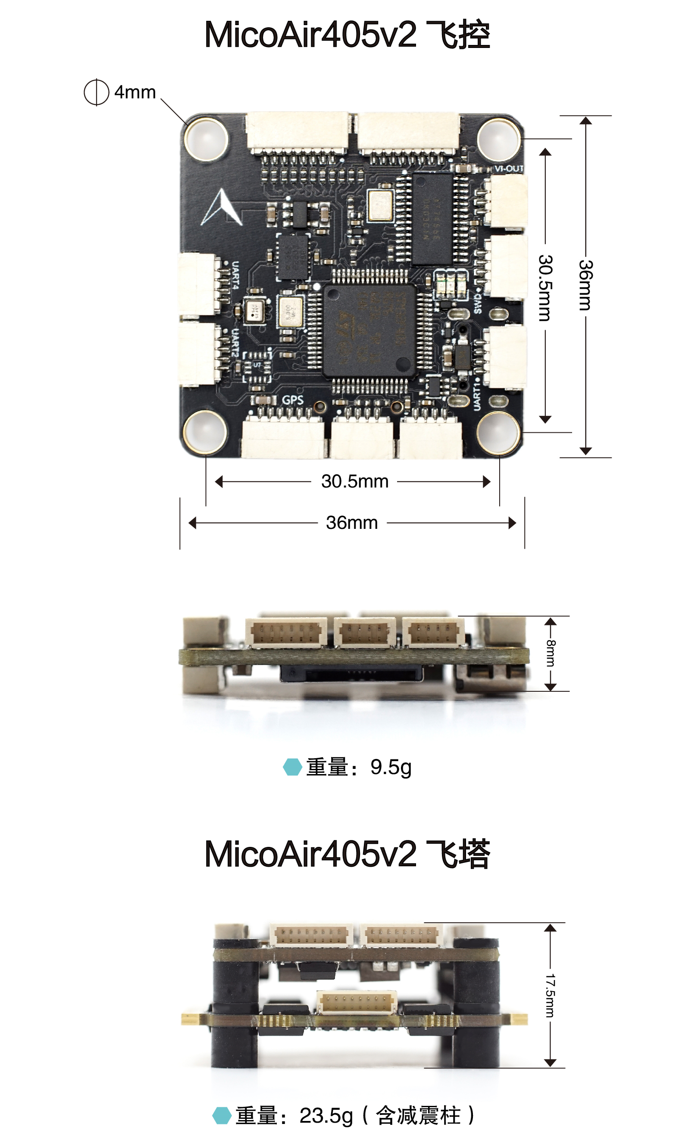
Installation recommendations:
- Mount the flight controller on silicone grommets or another vibration-isolation system to prevent high-frequency frame vibration from reaching the IMU directly.
- Install the board with its arrow pointing forward. If the frame requires a rotated installation, set the correct flight-controller orientation in the firmware.
Interfaces and Power
Pin Definition
Typical Wiring
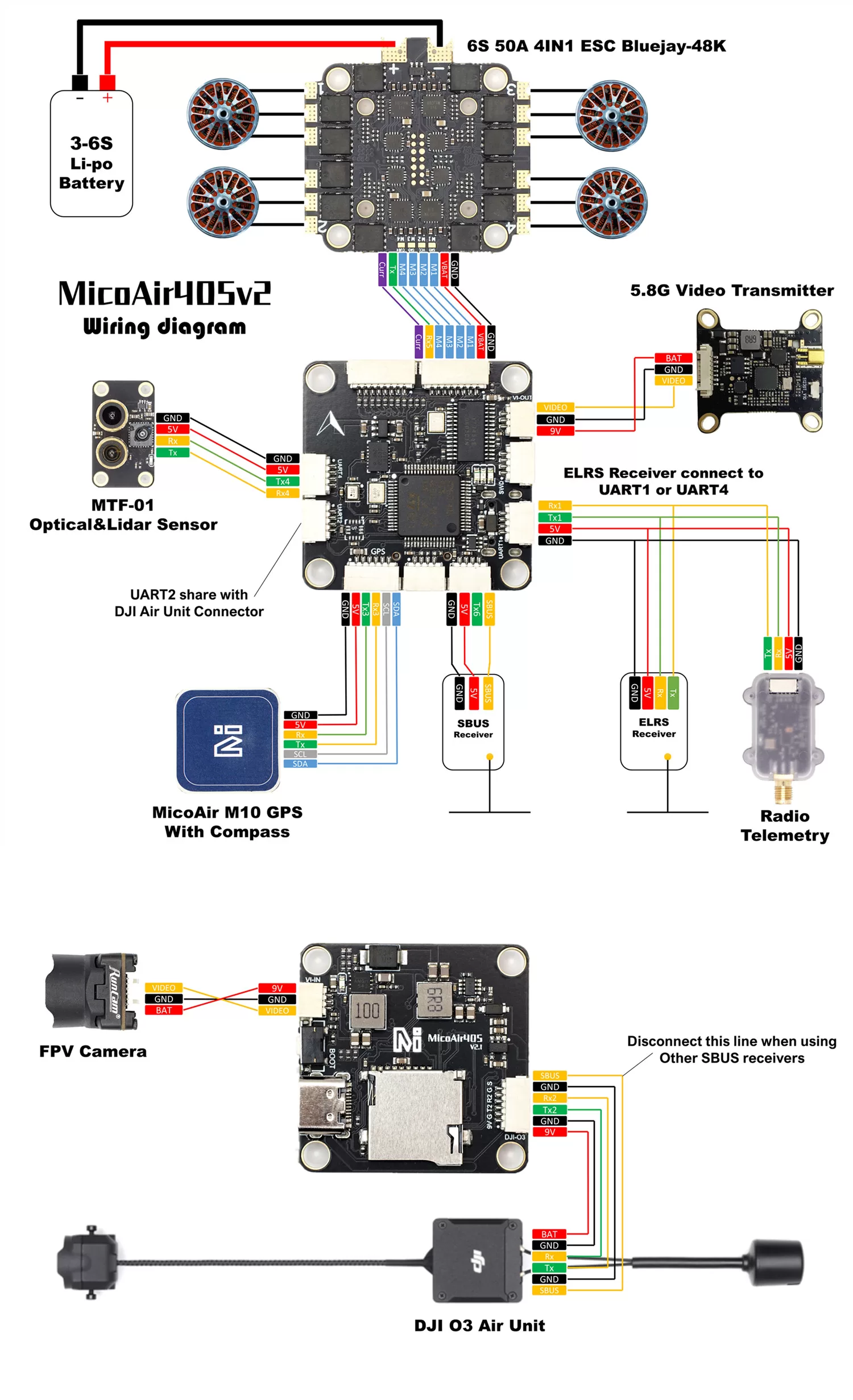
Follow these wiring principles:
- Connect a peripheral's
TXto the corresponding flight-controller UARTRX, and itsRXto the flight-controllerTX. - All communicating devices must share a common ground.
- GPS is normally connected to UART3. If the GPS includes a magnetometer, also connect I²C
SCLandSDA. - An SBUS receiver connects to UART6
RXby default. - Before using the dedicated 6-pin connector with a DJI O3 or another digital video transmitter, verify the 9 V, GND, TX, and RX pin order.
Serial Port Mapping
The ArduPilot serial-port mapping for MicoAir405v2 is shown below.
| ArduPilot parameter | Hardware interface | Default / recommended use | DMA |
|---|---|---|---|
SERIAL0 | USB | USB virtual serial port | — |
SERIAL1 | UART1 | Telemetry or another UART device | Supported |
SERIAL2 | UART2 | DJI digital video transmitter | Supported |
SERIAL3 | UART3 | GPS | — |
SERIAL4 | UART4 | Telemetry, receiver, or another peripheral | Supported |
SERIAL5 | UART5 RX | ESC telemetry | RX only |
SERIAL6 | UART6 | SBUS / RC input | TX6 has no DMA |
PWM Outputs
MicoAir405v2 provides up to ten PWM outputs. The hardware timer groups are listed below.
| Output | MCU pin | Timer | Group |
|---|---|---|---|
| M1 | PB0 | TIM3_CH3 | Group 1 |
| M2 | PB1 | TIM3_CH4 | Group 1 |
| M3 | PA15 | TIM2_CH1 | Group 2 |
| M4 | PB3 | TIM2_CH2 | Group 2 |
| M5 | PB4 | TIM3_CH1 | Group 1 |
| M6 | PB5 | TIM3_CH2 | Group 1 |
| M7 | PB8 | TIM4_CH3 | Group 3 |
| M8 | PB9 | TIM4_CH4 | Group 3 |
| M9 | PB14 | TIM12_CH1 | Group 4 |
| M10 | PB15 | TIM12_CH2 | Group 4 |
- M1–M8 support DShot.
- M1–M4 support bidirectional DShot.
- Outputs in the same timer group normally need to use compatible output protocols and frequencies.
Remove all propellers before motor testing, changing the motor order, or calibrating ESCs. Motors may start unexpectedly when parameters are written, the flight controller restarts, or a test command runs.
Receivers
SBUS
UART6 RX6 is an inverted SBUS input:
- Receiver signal → RX6 / SBUS
- Receiver power → 5 V, provided this matches the receiver's rated voltage
- Receiver ground → GND
CRSF / ELRS and Other UART Receivers
Connect bidirectional or non-inverted protocols such as CRSF, ELRS, and FPort to a standard full-duplex UART such as UART1 or UART4. In ArduPilot, set the corresponding SERIALx_PROTOCOL to 23, and repurpose or disable SERIAL6_PROTOCOL if it is no longer used.
OSD and Video Interfaces
Analog Video
MicoAir405v2 integrates an AT7456E that overlays flight data on an analog-video feed. Connect the analog camera to the CAM input and the analog video transmitter to the VTX output.
ArduPilot normally uses:
OSD_TYPE = 1
After configuration, use the ground station to adjust OSD element positions, units, and pages.
DJI Digital Video
UART2 is used for DJI digital-video communication by default. The dedicated SH1.0-6P connector also provides 9 V power. Whether the digital video system displays OSD, which protocol it uses, and which options can be configured depend on the flight-controller and video-transmitter firmware versions.
Battery Monitoring, Magnetometer, and I²C
Battery Monitoring
The default ArduPilot firmware parameters are:
| Parameter | Default | Description |
|---|---|---|
BATT_VOLT_PIN | 10 | Voltage-sensing channel |
BATT_CURR_PIN | 11 | Current-sensing channel |
BATT_VOLT_MULT | 21.2 | Voltage-divider multiplier |
BATT_AMP_PERVLT / current scale | 40.2 | Current-sensor conversion factor |
External Magnetometer
The flight controller has no onboard magnetometer. When connecting an external magnetometer:
- Connect
SCL,SDA, power, and GND correctly to I²C. - Keep the magnetometer as far as practical from power wires, ESCs, and motors.
- Confirm that the firmware detects the device.
- Verify the compass orientation and complete calibration.
I²C Expansion
Several devices with different addresses can share one I²C bus. Consider bus length, pull-up resistors, and address conflicts.
Flight Controller Firmware
ArduPilot
- Official hardware target:
MicoAir405v2 - Included in ArduPilot's official hardware support list starting with ArduPilot 4.5.0.
- Suitable for projects requiring full autonomous flight, mission planning, extensive peripheral support, and the ArduPilot ground-station ecosystem.
Related links:
- ArduPilot MicoAir405v2 hardware definition
- ArduPilot official firmware downloads
- ArduPilot Custom Firmware Builder
INAV
- MicoAir405v2 is supported starting with INAV 8.0.0.
- Suitable for fixed-wing aircraft, FPV aircraft, and navigation applications that emphasize manual flight.
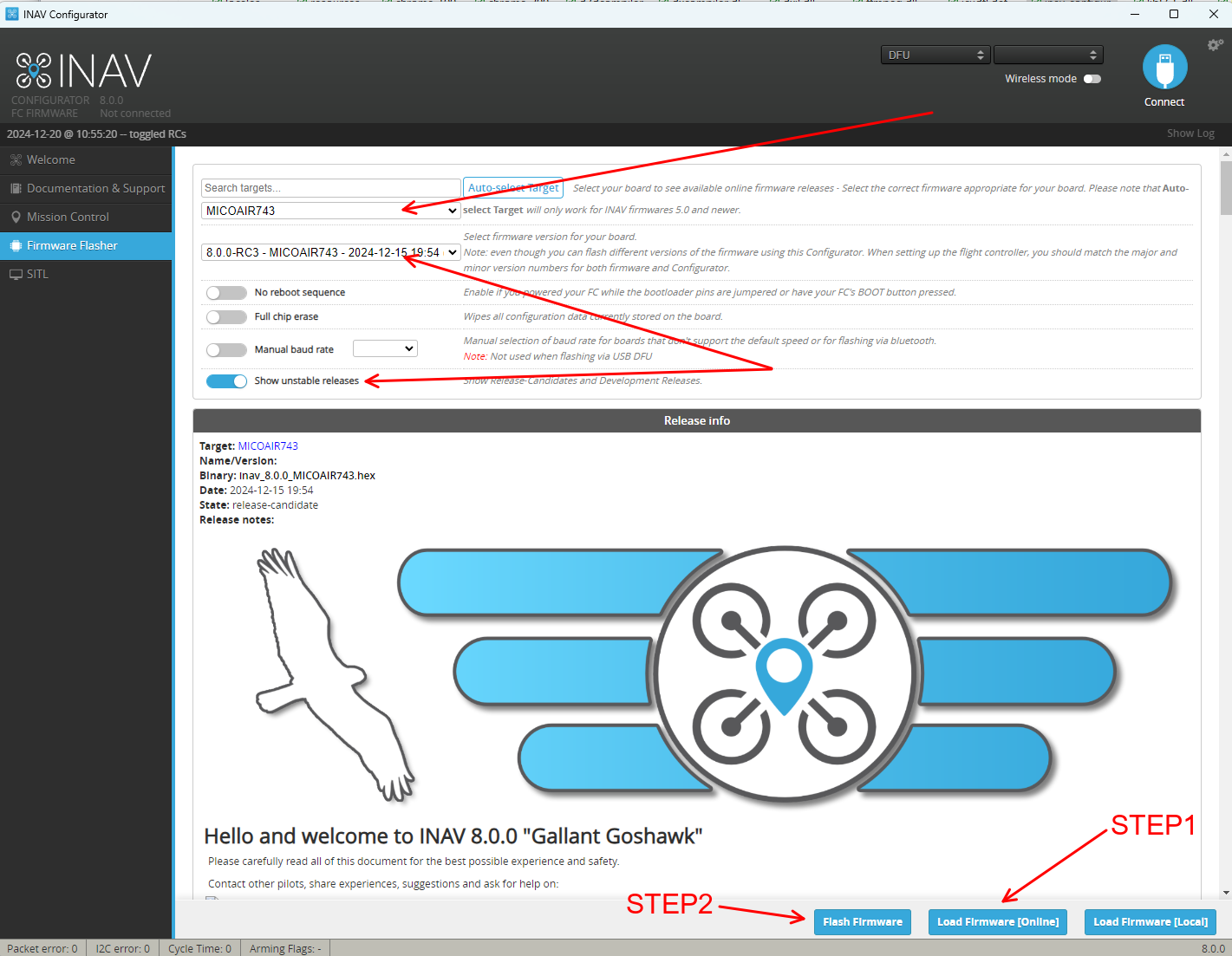
Related links:
Troubleshooting
USB Connects, but the GPS, Receiver, or Video Transmitter Does Not Work
- Check whether the peripheral requires the main battery to be connected.
- Confirm that the 5 V / 9 V outputs are working.
- Verify that TX and RX are cross-connected and that all devices share a common ground.
- Confirm that the serial protocol is configured on the correct
SERIALxport.
SBUS Is Not Detected
- Confirm that the signal is connected to UART6's inverted RX6 / SBUS input.
- Confirm that the receiver outputs SBUS rather than CRSF, IBUS, or a standard UART protocol.
- Check that
SERIAL6_PROTOCOLis configured for RC input.
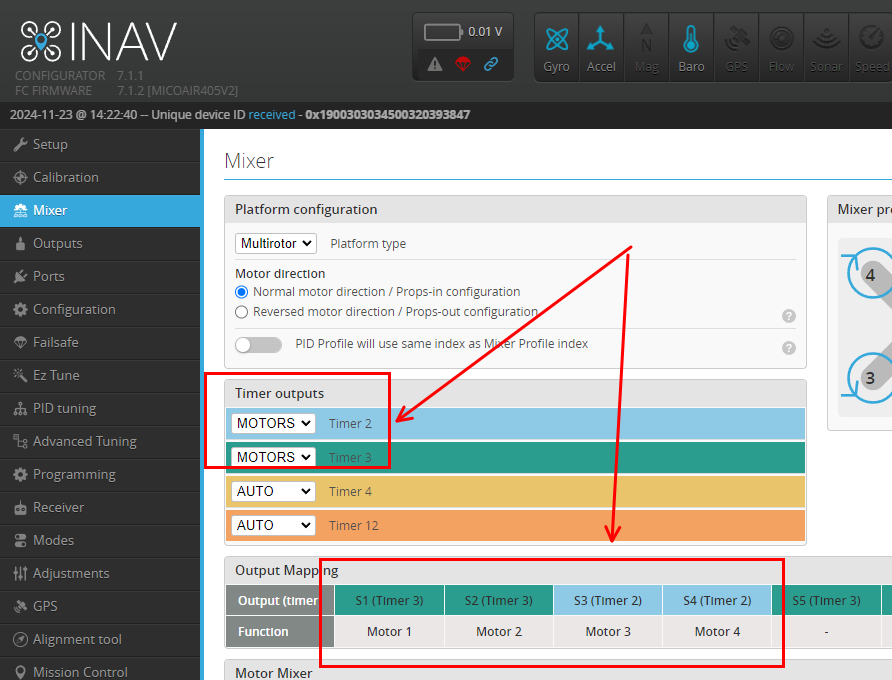
MOTOR3/4 Have No Output in INAV
Manually configure Timer2 and Timer3 as MOTORS.
Motors Do Not Respond When Arming or Using Motor Test in ArduPilot with the Matching Bluejay ESC
Set the flight controller's ESC protocol to DShot300. See the configuration tutorial for details.
Related Resources
Appendix A: Pinout Table
| Function | MCU pin | Alternate function / description |
|---|---|---|
| USB DM | PA11 | OTG1 DM |
| USB DP | PA12 | OTG1 DP |
| Blue LED | PA8 | Status indicator |
| Green LED | PC4 | Status indicator |
| Red LED | PC5 | Status indicator |
| UART1 TX | PA9 | USART1_TX |
| UART1 RX | PA10 | USART1_RX |
| UART2 TX | PA2 | USART2_TX, DJI-VTX |
| UART2 RX | PA3 | USART2_RX, DJI-VTX |
| UART3 TX | PB10 | USART3_TX, GPS |
| UART3 RX | PB11 | USART3_RX, GPS |
| UART4 TX | PA0 | UART4_TX |
| UART4 RX | PA1 | UART4_RX |
| UART5 RX | PD2 | ESC telemetry |
| UART6 TX | PC6 | USART6_TX |
| UART6 RX | PC7 | USART6_RX |
| SBUS inverter control | PC15 | SBUS_INV |
| I²C1 SCL | PB6 | External I²C |
| I²C1 SDA | PB7 | External I²C |
| Voltage ADC | PC0 | Battery-voltage sensing |
| Current ADC | PC1 | Battery-current sensing |
| M1 | PB0 | TIM3_CH3 |
| M2 | PB1 | TIM3_CH4 |
| M3 | PA15 | TIM2_CH1 |
| M4 | PB3 | TIM2_CH2 |
| M5 | PB4 | TIM3_CH1 |
| M6 | PB5 | TIM3_CH2 |
| M7 | PB8 | TIM4_CH3 |
| M8 | PB9 | TIM4_CH4 |
| M9 | PB14 | TIM12_CH1 |
| M10 | PB15 | TIM12_CH2 |
| OSD SPI SCK | PA5 | SPI1_SCK |
| OSD SPI MISO | PA6 | SPI1_MISO |
| OSD SPI MOSI | PA7 | SPI1_MOSI |
| OSD CS | PB12 | AT7456E chip select |
| IMU / barometer SPI SCK | PB13 | SPI2_SCK |
| IMU / barometer SPI MISO | PC2 | SPI2_MISO |
| IMU / barometer SPI MOSI | PC3 | SPI2_MOSI |
| SPL06 CS | PA4 | Barometer chip select |
| BMI088 accelerometer CS | PC13 | IMU chip select |
| BMI088 gyroscope CS | PC14 | IMU chip select |
| microSD SCK | PC10 | SPI3_SCK |
| microSD MISO | PC11 | SPI3_MISO |
| microSD MOSI | PC12 | SPI3_MOSI |
| microSD CS | PC9 | SD card chip select |
| SWDIO | PA13 | SWD debug |
| SWCLK | PA14 | SWD debug |