

Docs directory
Table of contents
External Compass Orientation in ArduPilot, PX4, INAV, and Betaflight
This guide covers external compass orientation when a MicoAir GPS or RTK module is connected to a flight controller. A compass built into the flight controller normally uses the orientation defined by that board's firmware; do not apply an external-compass setting to it.
Compass Orientation in ArduPilot and PX4
Automatic orientation detection depends on the hardware, firmware, and available compass measurements. It must not be assumed to work on every flight controller, particularly an AIO board without an onboard compass.
ArduPilot
The external compass orientation is configured with COMPASS_ORIENT. Automatic detection can use a working onboard compass as a reference during calibration. If a suitable reference is not available, set the external compass orientation manually for the module's mounting direction.
PX4
The external compass orientation is configured with CAL_MAGx_ROT, where x identifies the compass instance. SENS_MAG_AUTOROT controls automatic orientation detection during calibration. On AIO boards without an onboard compass, do not rely on this feature to determine the external compass orientation correctly; configure the appropriate CAL_MAGx_ROT manually.
Orientation Reference
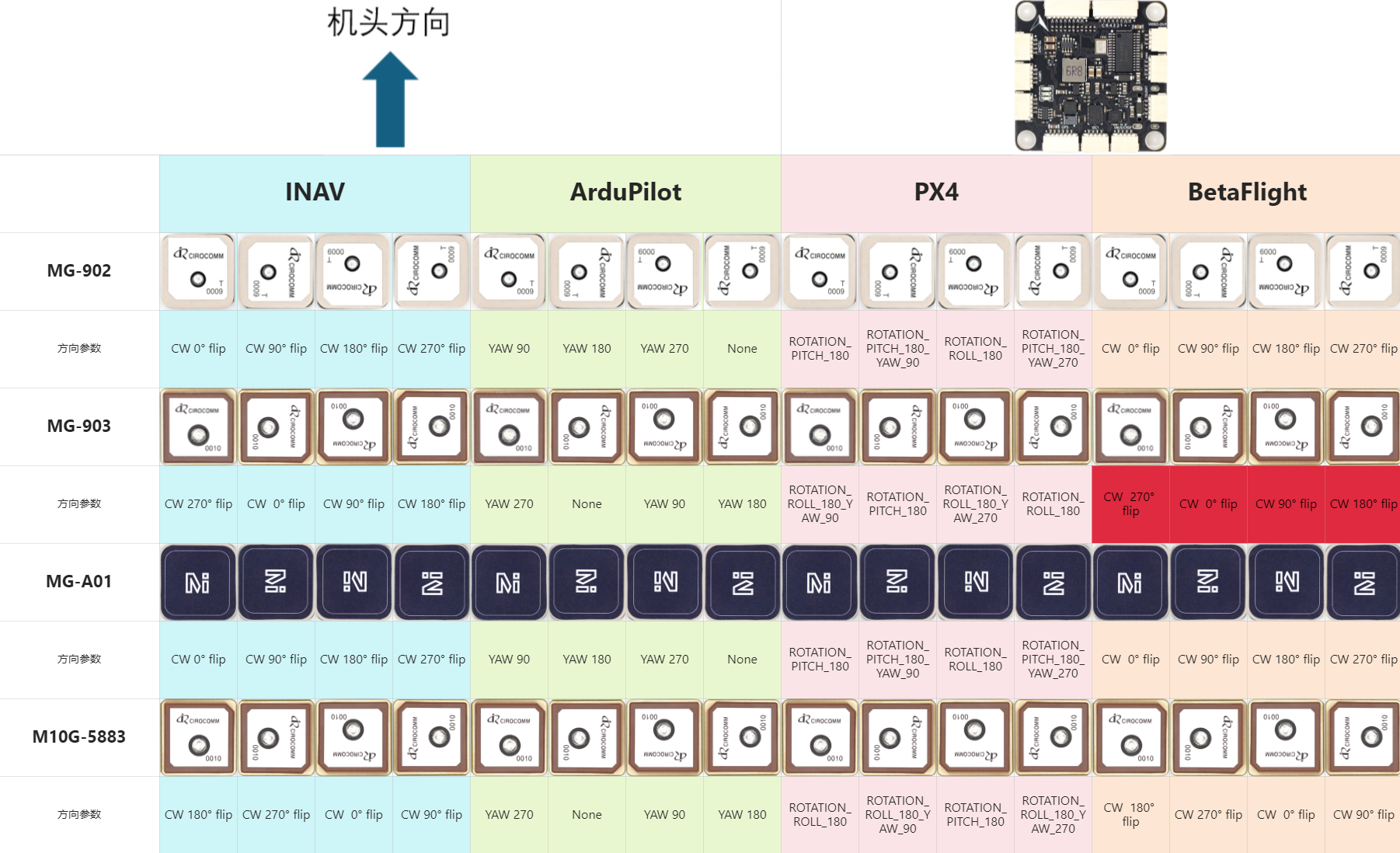
Select the setting for the exact module, mounting direction, and firmware. The diagram below is the existing reference for the GPS modules shown; do not assume it covers every GPS or RTK model. If your model is not listed, use its model-specific manual.
Compass Orientation in Betaflight
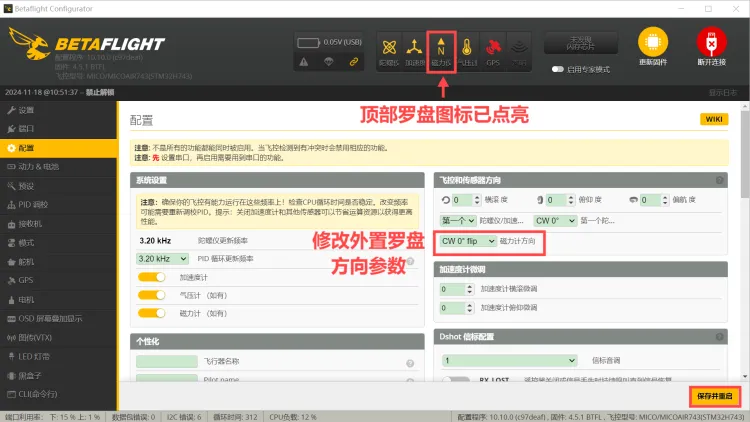
For MicoAir firmware builds provided as intmag and extmag variants, select extmag when using the external compass in a GPS or RTK module. These build suffixes describe the supplied variants, not a universal naming convention for all Betaflight boards. Set the mounting orientation manually for the module and then calibrate the compass.
Compass Orientation in INAV
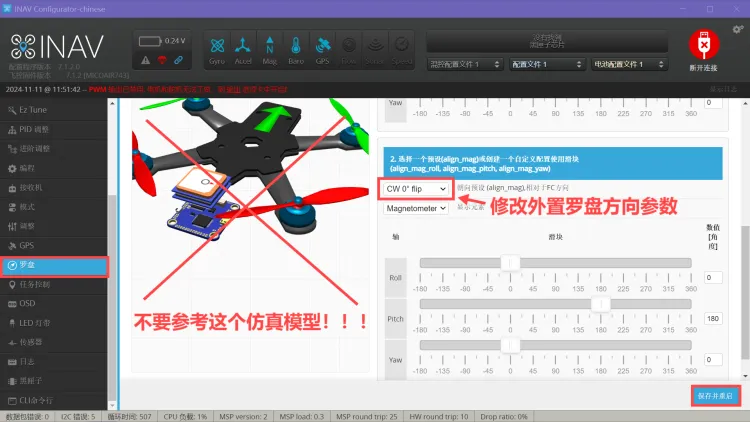
For MicoAir firmware builds provided as intmag and extmag variants, select extmag for the external compass. Set the mounting orientation manually and then calibrate. Do not use an internal-compass-only build for an external compass.
External Compass Setup on an AIO Flight Controller
MicoAir AIO flight controllers do not have an onboard compass. After connecting a GPS or RTK module with a compass:
- Connect the flight controller to MicoConfigurator or the configurator appropriate to the installed firmware.
- Confirm that the external compass is detected.
- For ArduPilot or PX4, disable automatic compass orientation detection and set
COMPASS_ORIENTor the external compass'sCAL_MAGx_ROTto match the module and mounting direction. For INAV or Betaflight, use the appropriate external-compass build and configure the orientation manually. - Save the settings and restart if required by the firmware.
- Complete compass calibration, then verify the heading before arming.
Verify the Heading
Check that calibration completes successfully and that the ground station heading agrees with the aircraft's actual orientation. Rotate the aircraft slowly and confirm that the indicated heading changes in the correct direction.
A phone compass can provide a rough comparison if its top edge points in the same direction as the aircraft's nose. Keep magnetic interference away and ensure the two readings use the same magnetic/true-north reference before comparing them.
A persistent offset of approximately 90°, 180°, or 270° indicates a likely orientation-setting error. Recheck the module's mounting direction and orientation parameters, recalibrate, and verify the heading before any flight test.