

Docs directory
Table of contents
NxtPX4v2 User Manual
Product Overview
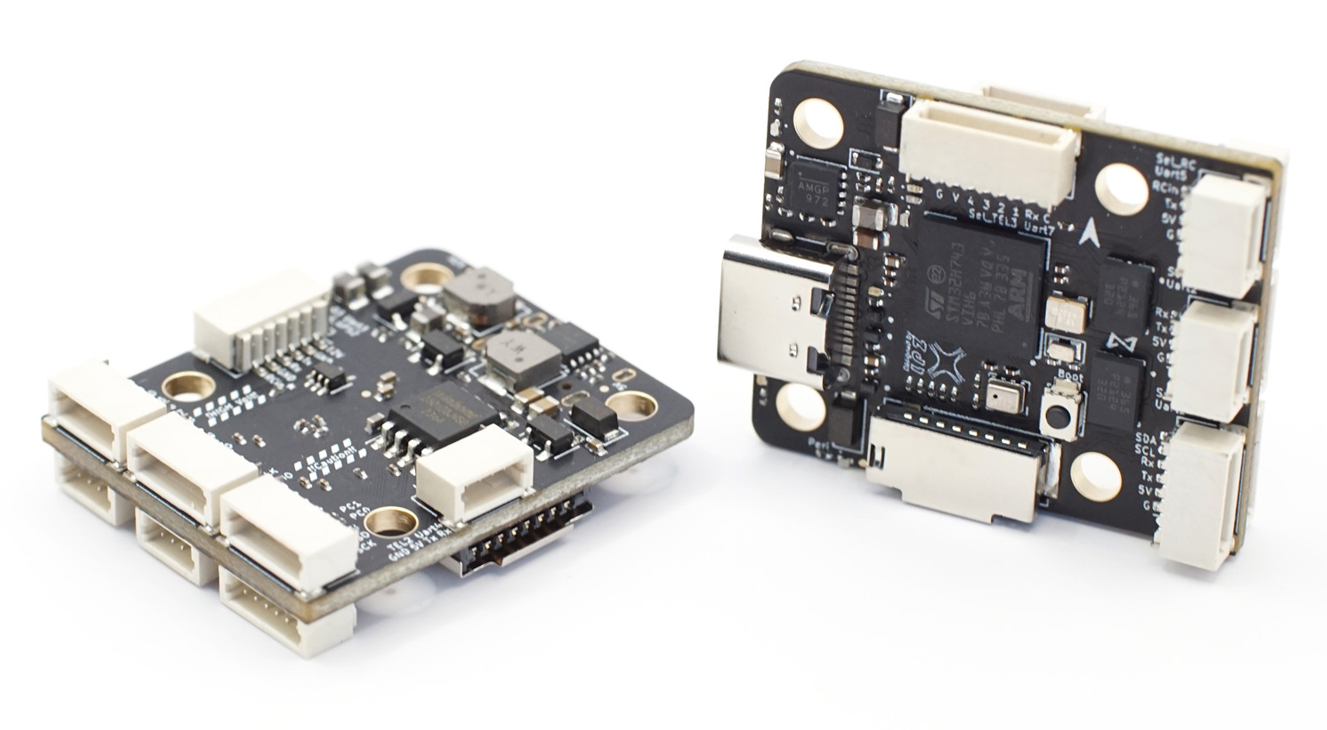
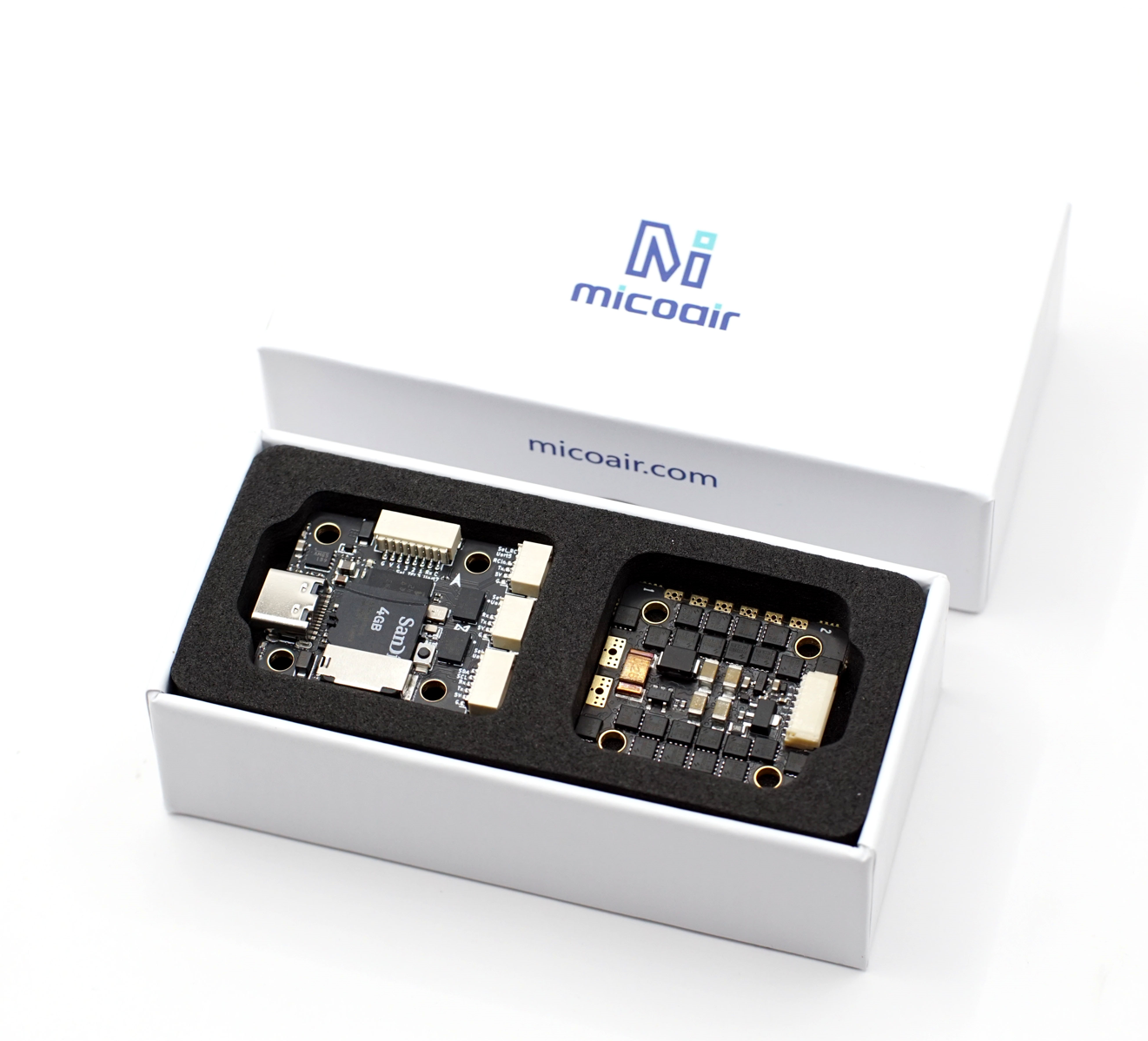
NxtPX4v2 is a compact, high-performance flight controller developed from the HKUST Aerial Robotics / Nxt hardware family. It features an STM32H743 MCU, dual BMI088 IMUs, an SPL06 barometer, and microSD storage, along with 7 UARTs, 8 PWM outputs, external I²C and SPI buses, and independent 5 V / 12 V BECs. The flight controller supports both ArduPilot and PX4 and is well suited to UAV projects that require substantial processing performance, redundant IMU sensing, and open hardware resources.
Key Features
| Item | Specification |
|---|---|
| Main MCU | STM32H743VIH6, 480 MHz, 2 MB Flash |
| IMU | Dual BMI088 IMUs |
| Barometer | SPL06 |
| Data logging | microSD card slot |
| Serial ports | 7 UARTs |
| Motor / servo outputs | 8 PWM outputs |
| Expansion buses | 1 external I²C, 1 external SPI, and 1 SWD interface |
| Analog sensing | 2 ADC channels for voltage and current monitoring |
| USB | USB Type-C |
| Regulated outputs | 5 V / 2.5 A and 12 V / 2.5 A |
| Firmware support | ArduPilot and PX4 |
| Mounting pattern | 20 × 20 mm, approximately 3 mm hole diameter |
| Overall dimensions | Approximately 27 × 32 × 8 mm |
| Weight | Approximately 6.5 g |
Purchase
Hardware Specifications
Processor and Sensors
The STM32H743VIH6 provides a 480 MHz clock speed and 2 MB of Flash. Two BMI088 IMUs provide independent inertial measurements for sensor-consistency checks and redundancy. The SPL06 provides barometric altitude measurements.
NxtPX4v2 does not include an onboard magnetometer. When heading information is required, connect a GPS module with an integrated magnetometer or a standalone magnetometer through the external I²C bus.
Interfaces and Outputs
- 7 UARTs for GPS, telemetry, digital video, receivers, ESC telemetry, and other devices.
- 8 PWM outputs, each usable for a motor or servo.
- 1 external I²C bus for magnetometers, airspeed sensors, and other devices.
- 1 external SPI bus for advanced expansion.
- 3 AUX GPIOs for custom functions.
- 2 ADC channels for voltage and current sensing.
- microSD for flight-log storage.
- SWD for low-level debugging and recovery.
Power and Mechanical Specifications
The flight controller provides regulated 5 V / 2.5 A and 12 V / 2.5 A outputs. The power input supports 3–6S batteries.
Dimensions and Installation
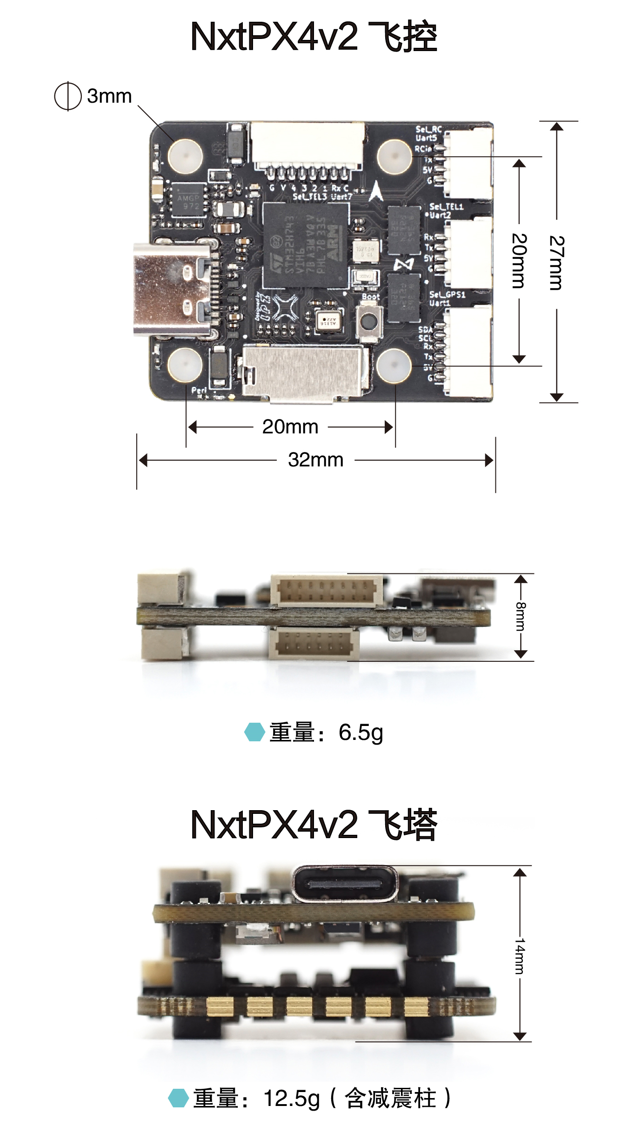
Installation recommendations:
- Use 20 × 20 mm soft-rubber standoffs or another vibration-isolated mounting structure.
- Install the board according to its arrow. If the board is rotated, configure the correct orientation in the firmware.
- Keep GPS antennas, power cables, and digital video-transmitter antennas away from the IMU area.
- Leave enough service clearance for the USB Type-C connector and microSD card slot.
- Dual IMUs improve diagnostic capability but do not replace proper mechanical vibration isolation.
During the initial installation, take clear photos of the front and back of the flight controller and all wiring harnesses. These photos are useful later when checking connector orientation, wire order, or the hardware revision.
Interfaces and Power
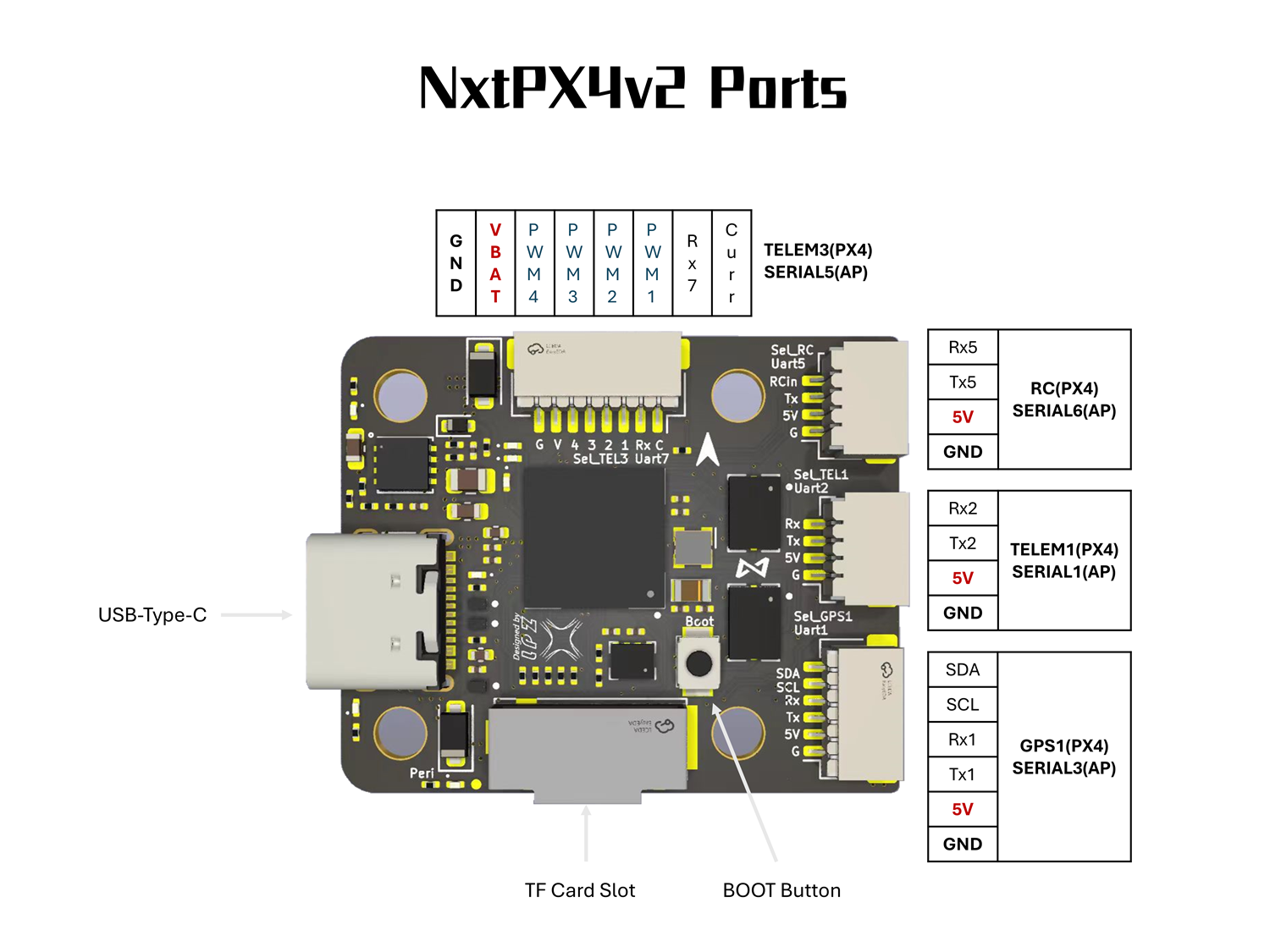
Interface Definitions
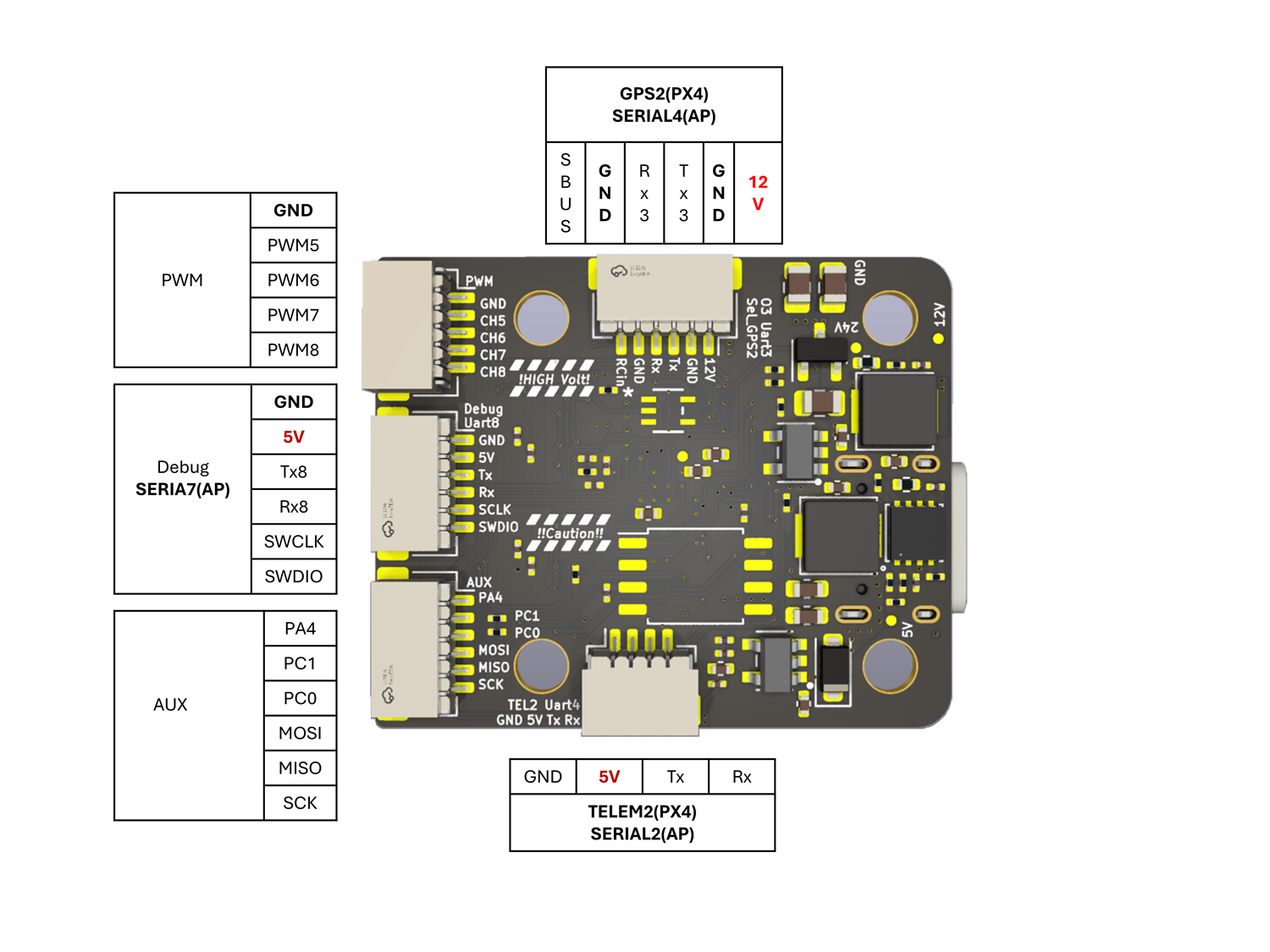
Typical Wiring
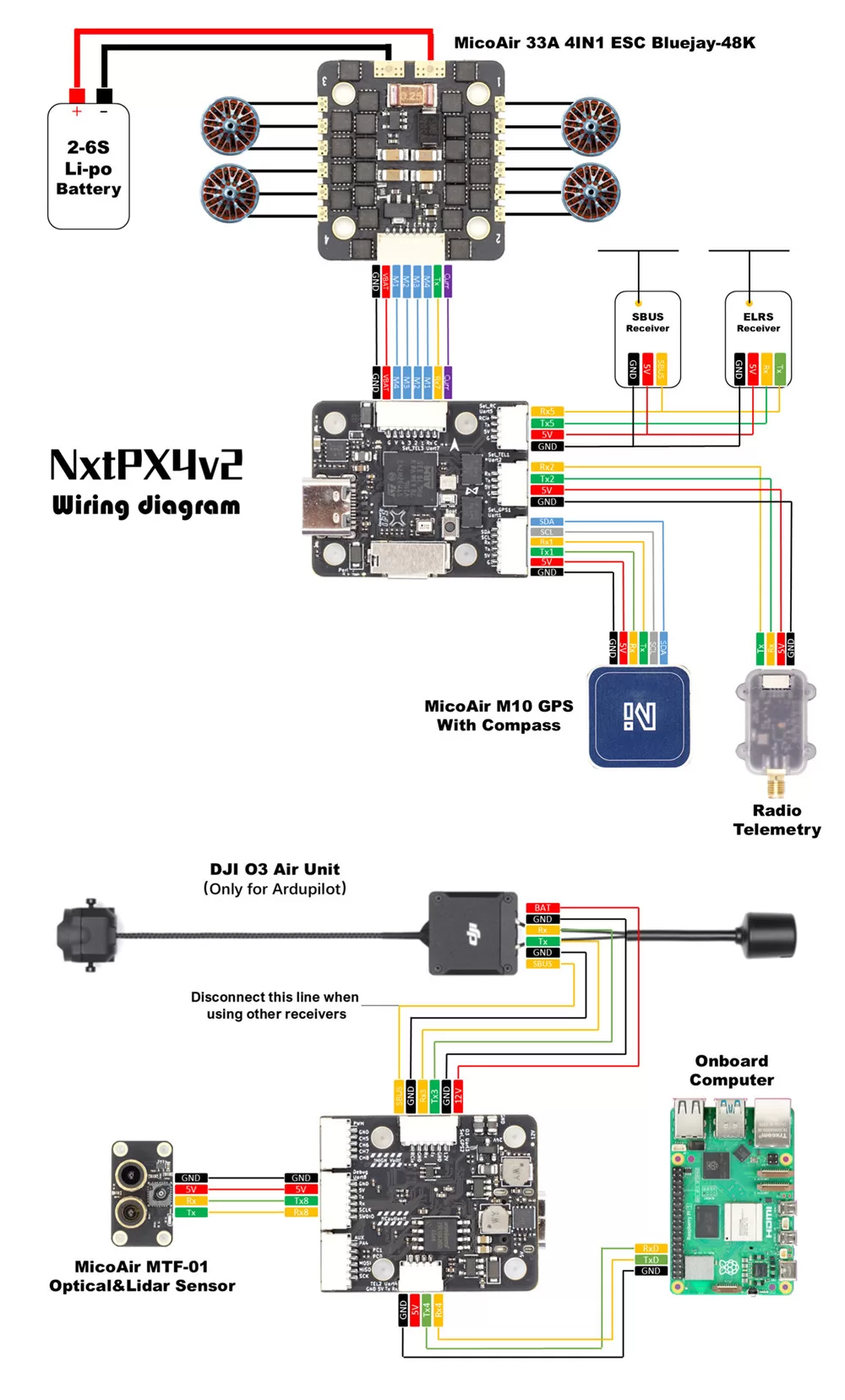
Wiring principles:
- Connect a peripheral's
TXto the flight controller'sRX, and itsRXto the flight controller'sTX. - Every serial peripheral must share a common ground with the flight controller.
- Connect the primary GPS to UART1 and an external magnetometer to the external I²C bus.
- Connect the DJI O3 to the dedicated UART3 interface, checking the 12 V pin and wire order before connection.
- Connect an SBUS or CRSF receiver to UART5.
NxtPX4v2 does not enable peripheral power outputs when powered only through USB. If the ground station can connect to the flight controller but cannot detect an external magnetometer or other peripheral, connect the main battery first and then reconnect USB for diagnosis.
Serial-Port Mapping
| ArduPilot Parameter | Hardware Interface | Default / Recommended Use |
|---|---|---|
SERIAL0 | USB | USB virtual serial port |
SERIAL1 | UART2 | TELEM1 / telemetry |
SERIAL2 | UART4 | TELEM2 / telemetry |
SERIAL3 | UART1 | GPS1 |
SERIAL4 | UART3 | DJI O3 |
SERIAL5 | UART7 RX | ESC telemetry |
SERIAL6 | UART5 | RC input |
SERIAL7 | UART8 | TELEM3 / other serial devices |
| PX4 Device Name | Hardware Interface | Default / Recommended Use |
|---|---|---|
| USB | USB | USB virtual serial port |
GPS1 | UART1 | Primary GPS |
TELEM1 | UART2 | Telemetry |
GPS2 | UART3 | DJI O3 / secondary GPS, depending on airframe configuration |
TELEM2 | UART4 | Telemetry |
RC | UART5 | SBUS / CRSF receiver |
TELEM3 | UART7 | ESC telemetry or serial expansion |
TELEM4 / SERIAL4 | UART8 | Telemetry or other serial devices |
PWM Outputs
NxtPX4v2 provides 8 PWM outputs with the following hardware timer groups:
| Output | MCU Pin | Timer | Group |
|---|---|---|---|
| M1 | PE9 | TIM1_CH1 | Group 1 |
| M2 | PE11 | TIM1_CH2 | Group 1 |
| M3 | PE13 | TIM1_CH3 | Group 1 |
| M4 | PE14 | TIM1_CH4 | Group 1 |
| M5 | PB10 | TIM2_CH3 | Group 2 |
| M6 | PB11 | TIM2_CH4 | Group 2 |
| M7 | PB0 | TIM3_CH3 | Group 3 |
| M8 | PB1 | TIM3_CH4 | Group 3 |
- M1–M8 support DShot.
- All 8 outputs support bidirectional DShot under ArduPilot.
- Channels in the same group should generally use compatible output protocols and frequencies.
Receiver
UART5 is the default RC interface and supports serial receivers using SBUS, CRSF, and similar protocols.
SBUS
- Connect the signal wire to the UART5 RC input.
- Use an appropriate power output from the flight controller and connect GND.
- ArduPilot uses
SERIAL6_PROTOCOL=23by default. - PX4 can use
RC_INPUT_PROTO=Autofor automatic detection.
CRSF / ELRS
CRSF / ELRS is a high-speed bidirectional protocol and requires both UART5 TX and RX.
If the receiver powers on but provides no channel data, first check the protocol, TX/RX direction, and serial-port mapping.
Battery Monitoring, Magnetometer, and I²C
Battery Monitoring
The ArduPilot firmware defaults are:
| Parameter | Default | Description |
|---|---|---|
BATT_MONITOR | 4 | Analog voltage and current monitoring |
BATT_VOLT_PIN | 4 | Voltage-sensing channel |
BATT_CURR_PIN | 8 | Current-sensing channel |
BATT_VOLT_MULT | 10.2 | Voltage-divider factor |
BATT_AMP_PERVLT | 20.4 | Current-sensor conversion factor |
Current-sensor scaling can vary between power modules. Calibrate with a multimeter and a known load rather than copying factors from another flight controller.
External Magnetometer
The flight controller does not include a magnetometer. Connect an external magnetometer to I²C4:
SCL→ PD12SDA→ PD13
External sensors may not receive power when the board is powered only through USB. If the magnetometer is not detected, connect the main battery to enable peripheral power, then connect USB and the ground station.
Flight-Controller Firmware
ArduPilot
- Official hardware target:
NxtPX4v2 - Included in the official hardware support list starting with ArduPilot 4.6.0.
- Supports online firmware flashing through Mission Planner and MicoConfigurator.
Related links:
- ArduPilot NxtPX4v2 hardware definition
- Official ArduPilot firmware downloads
- ArduPilot Custom Firmware Builder
PX4
- PX4 board target:
hkust_nxt-dual - Bootloader target:
hkust_nxt-dual_bootloader - MicoConfigurator can flash PX4 firmware online in DFU mode.
Official PX4 firmware build guide
Build the default firmware from the PX4 source:
make hkust_nxt-dual
Build the bootloader:
make hkust_nxt-dual_bootloader
Related links:
Troubleshooting
External Magnetometer Is Not Detected with USB Power Only
This is a common effect of the peripheral-power state. Connect the main battery first to enable the external 5 V / 12 V rails, then connect USB and the ground station and run detection again.
Related Resources
- NxtPX4 open-hardware repository
- Nxt-Dual hardware files
- ArduPilot NxtPX4v2 hardware definition
- PX4-Autopilot
Appendix A: Pinout Table
| Function | MCU Pin | Alternate Function / Description |
|---|---|---|
| USB DM | PA11 | OTG1 DM |
| USB DP | PA12 | OTG1 DP |
| USB VBUS detection | PD0 | USB power detection |
| Red LED | PD15 | Status indicator |
| Green LED | PD11 | Status indicator |
| Blue LED | PB15 | Status indicator |
| GPS1 TX | PA9 | USART1_TX |
| GPS1 RX | PA10 | USART1_RX |
| TELEM1 TX | PD5 | USART2_TX |
| TELEM1 RX | PD6 | USART2_RX |
| DJI O3 TX | PD8 | USART3_TX |
| DJI O3 RX | PD9 | USART3_RX |
| TELEM2 TX | PB9 | UART4_TX |
| TELEM2 RX | PB8 | UART4_RX |
| RC TX | PB13 | UART5_TX |
| RC RX | PB12 | UART5_RX |
| SBUS inverter control | PD14 | SBUS_INV |
| ESC telemetry RX | PE7 | UART7_RX |
| TELEM3 TX | PE1 | UART8_TX |
| TELEM3 RX | PE0 | UART8_RX |
| Internal I²C SCL | PB6 | I²C1_SCL, onboard barometer |
| Internal I²C SDA | PB7 | I²C1_SDA, onboard barometer |
| External I²C SCL | PD12 | I²C4_SCL |
| External I²C SDA | PD13 | I²C4_SDA |
| M1 | PE9 | TIM1_CH1 |
| M2 | PE11 | TIM1_CH2 |
| M3 | PE13 | TIM1_CH3 |
| M4 | PE14 | TIM1_CH4 |
| M5 | PB10 | TIM2_CH3 |
| M6 | PB11 | TIM2_CH4 |
| M7 | PB0 | TIM3_CH3 |
| M8 | PB1 | TIM3_CH4 |
| AUX1 | PA4 | GPIO 81 |
| AUX2 | PC1 | GPIO 82 |
| AUX3 | PC0 | GPIO 83 |
| Voltage ADC | PC4 | Battery-voltage sensing |
| Current ADC | PC5 | Battery-current sensing |
| microSD CLK | PC12 | SDMMC clock |
| microSD CMD | PD2 | SDMMC command |
| microSD D0 | PC8 | SDMMC data |
| microSD D1 | PC9 | SDMMC data |
| microSD D2 | PC10 | SDMMC data |
| microSD D3 | PC11 | SDMMC data |
| IMU1 SPI SCK | PA5 | SPI1_SCK |
| IMU1 SPI MISO | PA6 | SPI1_MISO |
| IMU1 SPI MOSI | PA7 | SPI1_MOSI |
| IMU1 gyro CS | PA3 | BMI088 chip select |
| IMU1 accelerometer CS | PA2 | BMI088 chip select |
| External SPI SCK | PB3 | SPI3_SCK |
| External SPI MISO | PB4 | SPI3_MISO |
| External SPI MOSI | PB2 | SPI3_MOSI |
| IMU2 SPI SCK | PE2 | SPI4_SCK |
| IMU2 SPI MISO | PE5 | SPI4_MISO |
| IMU2 SPI MOSI | PE6 | SPI4_MOSI |
| IMU2 gyro CS | PC2 | BMI088 chip select |
| IMU2 accelerometer CS | PC13 | BMI088 chip select |
| SWDIO | PA13 | SWD debugging |
| SWCLK | PA14 | SWD debugging |