

Docs directory
Table of contents
MicoAir743v2-AIO-45A User Manual
Product Overview
MicoAir743v2-AIO-45A is an AIO solution from MicoAir that integrates an H743 flight controller and a four-in-one ESC on a single circuit board with a 25.5 × 25.5 mm mounting-hole pattern. The flight-controller section uses a 480 MHz STM32H743VIH6, dual BMI088 + BMI270 IMUs, an SPL06 barometer, and microSD log storage. The ESC section consists of four 45 A, 32-bit open-source AM32 ESCs.
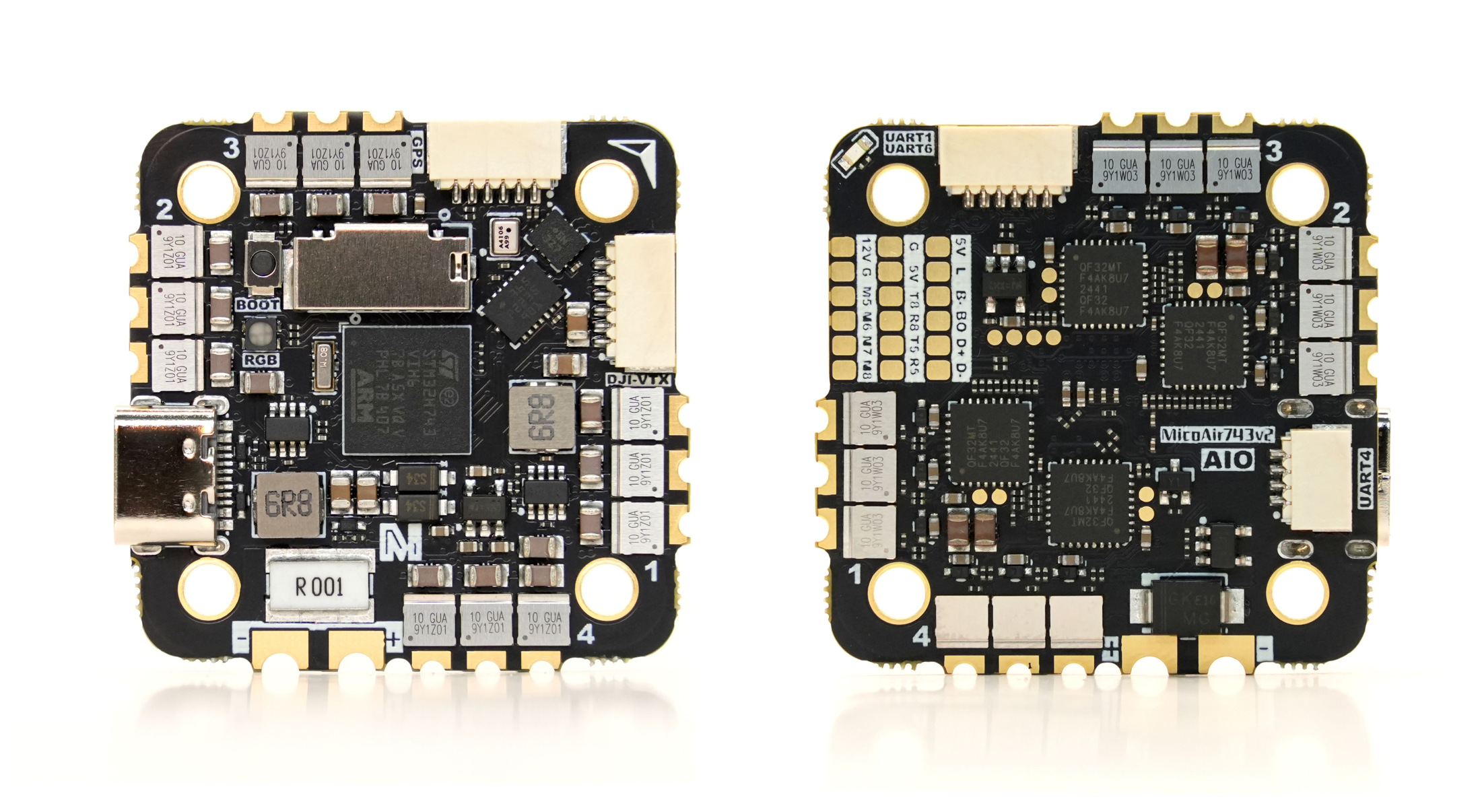
Key Features
STM32H743VIH6, 480 MHz, 2 MB Flash- Dual
BMI088 + BMI270IMUs SPL06barometer and microSD card slot- 7 UARTs, 8 motor outputs, 1 I²C bus, and 1 SWD interface
- LED strip, buzzer, BOOT button, and USB Type-C
- Dual 5 V / 2 A and 12 V / 2 A BECs
- Onboard battery-voltage and current sensing
- Direct DJI O3/O4/O4 Pro interface with MSP DisplayPort support
- 4 × 45 A AM32 ESCs, 48 kHz, supporting PWM / DShot300 / DShot600 and bidirectional DShot
- Supports ArduPilot, PX4, INAV, Betaflight, and Skybrush firmware
Purchase
Hardware Specifications
Flight Controller Section
| Item | Specification |
|---|---|
| Main MCU | STM32H743VIH6, 480 MHz, 2 MB Flash |
| IMU | Dual BMI088 + BMI270 IMUs |
| Barometer | SPL06 |
| Magnetometer | No onboard magnetometer; supports an external I²C magnetometer |
| Analog OSD | None; HD video transmitters use MSP DisplayPort |
| Log storage | microSD card slot |
| UART | 7: UART1, UART2, UART3, UART4, UART5, UART6, and UART8 |
| Motor outputs | M1–M8; hardware supports DShot / bidirectional DShot, while actual capability depends on the firmware |
| Other outputs | LED strip; corresponds to PWM11 in the firmware resources |
| Peripheral interfaces | 1 I²C, 1 SWD, 2 ADCs, and a buzzer |
| USB | USB Type-C, with D+ / D− pads also provided |
ESC Section
| Item | Specification |
|---|---|
| ESC firmware | AM32_F4A_4IN1_F421_2.19 |
| PWM frequency | 48 kHz |
| Supported protocols | PWM, DShot300, DShot600, and bidirectional DShot |
| Continuous current | 45 A × 4; adequate cooling must be provided |
| Battery input | 3–6S (approximately 10–27 V) |
| Recommended starting protocol | DShot300 |
The “45 A continuous current” rating depends on propeller airflow, ambient temperature, and cooling conditions.
Power
| Item | Specification |
|---|---|
| Main power input | 3–6S (approximately 10–27 V) |
| 5 V BEC | Maximum 2 A, for receivers, GPS modules, optical-flow sensors, and other peripherals |
| 12 V BEC | Maximum 2 A, for DJI O3/O4/O4 Pro and similar devices |
Voltage and Current Sensing Factors
| Parameter | ArduPilot | PX4 | Betaflight | INAV |
|---|---|---|---|---|
| Voltage Factor | 21.12 | 21.12 | 211 | 211 |
| Current Factor | 14.14 | 14.14 | 707 | 707 |
Dimensions and Installation
| Item | Specification |
|---|---|
| Mounting-hole pattern | 25.5 × 25.5 mm |
| Mounting-hole diameter | Φ3 mm |
| Dimensions | 36 × 36 × 8 mm |
| Weight | 10 g |
The AIO must be installed at a 45° angle.
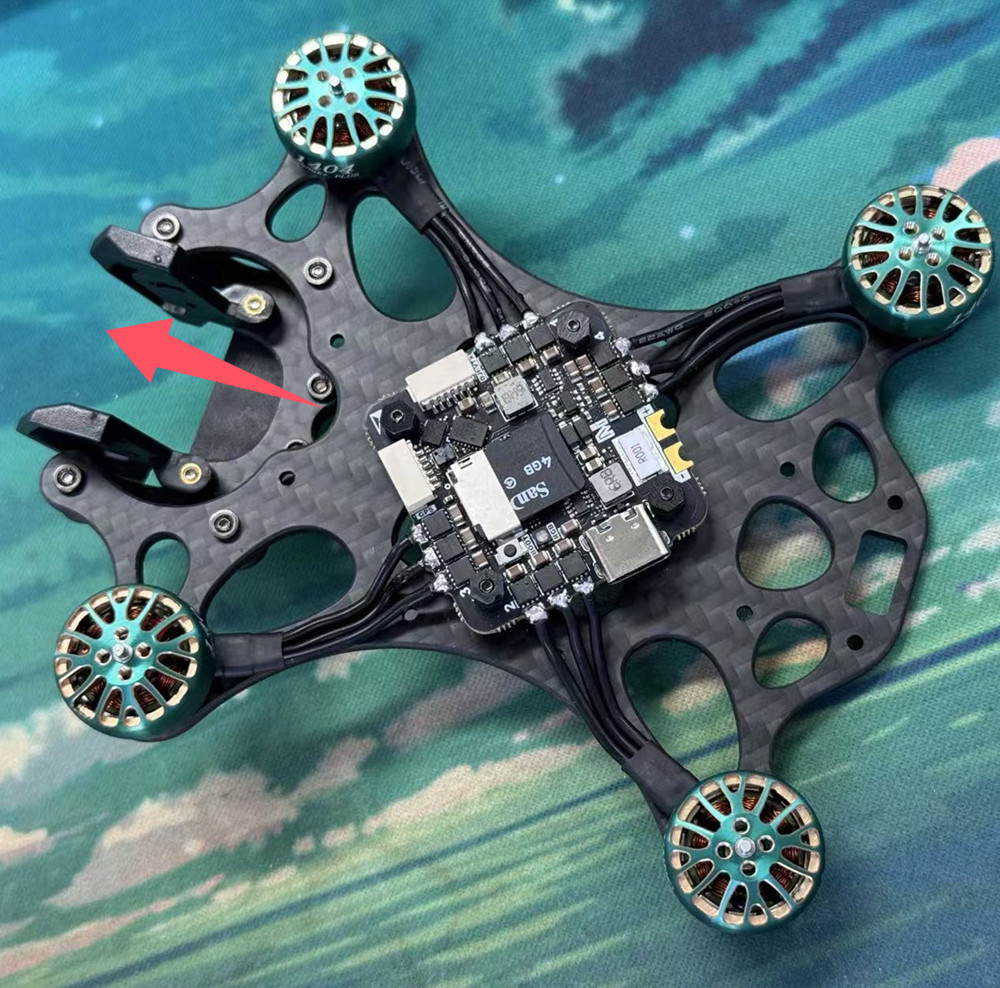
- The arrow on the board points toward the nose by default, and the side with the component markings faces up.
- Secure it with insulating vibration-damping standoffs to prevent screws or carbon-fiber plates from touching pads or components.
- Keep airflow around the ESC MOS area, and do not completely cover it with foam, double-sided tape, or wiring harnesses.
Interfaces and Power
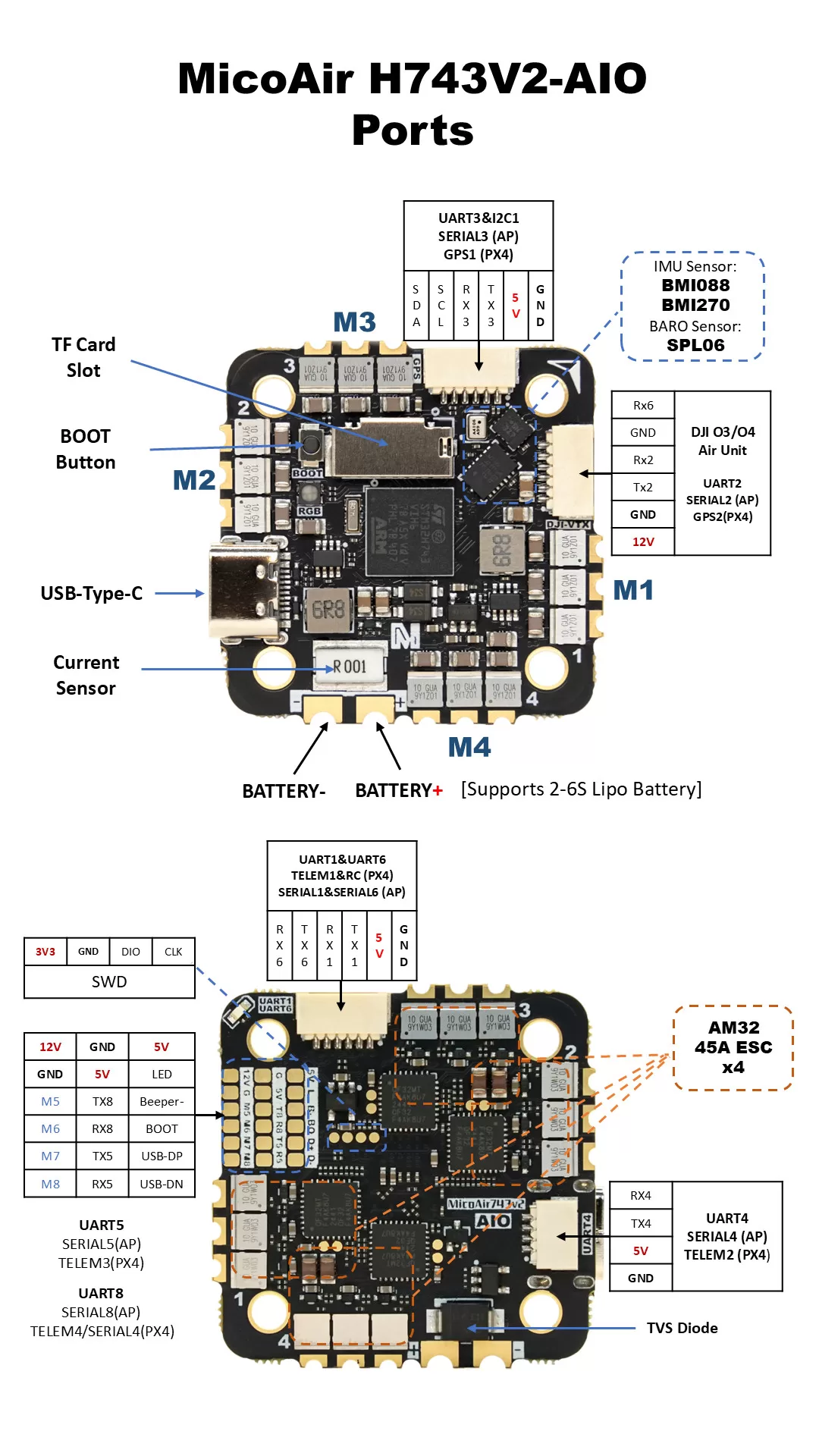
Pin Definition
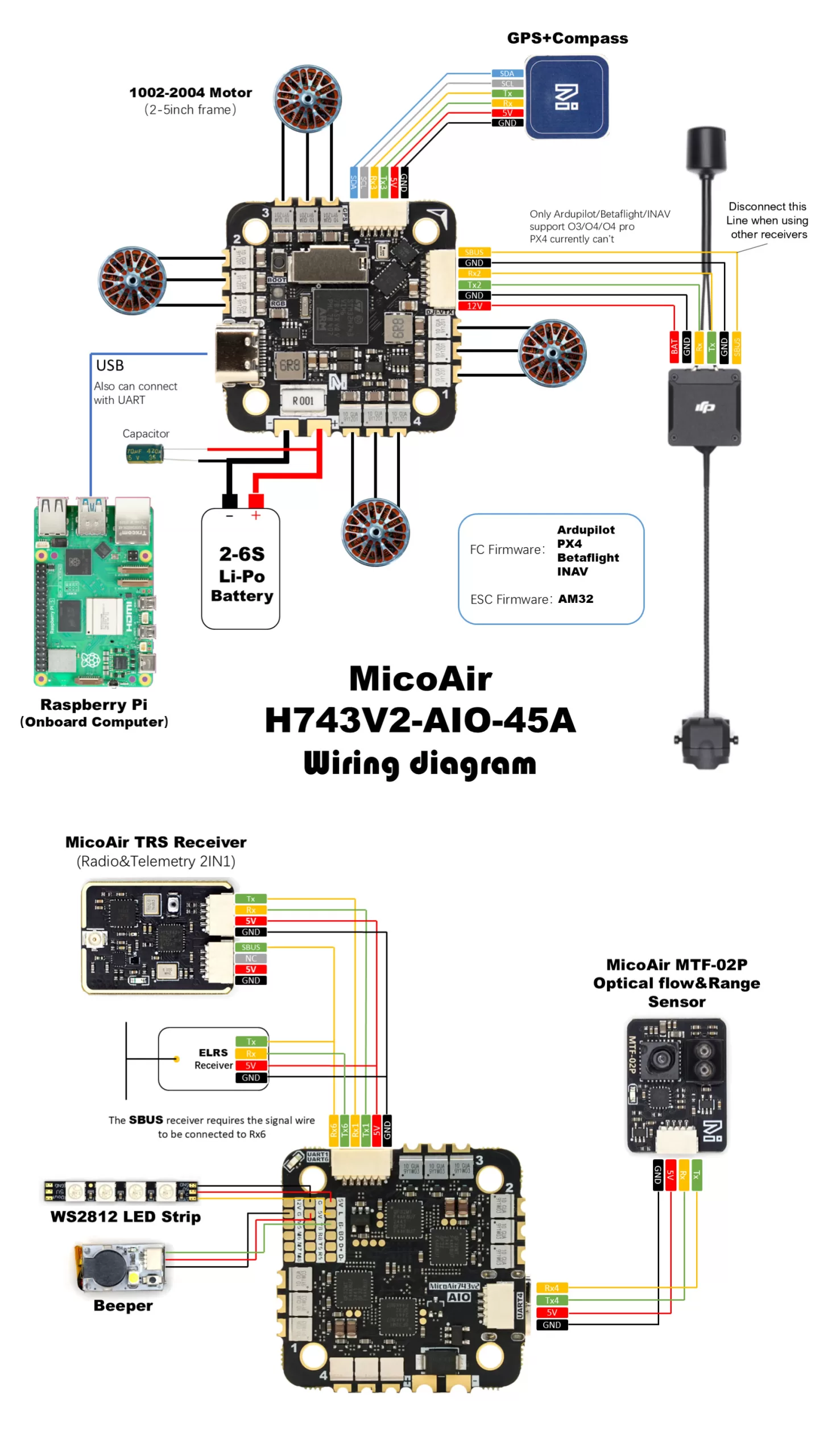
Typical Wiring
Power Rules
| Interface | Voltage | Typical use | Precautions |
|---|---|---|---|
VBAT | 3–6S | Main power for the flight controller and four-in-one ESC | Never reverse the polarity; confirm the battery specification before soldering |
5V | 5 V | Receivers, GPS modules, optical-flow sensors, rangefinders, and other peripherals | Total load must not exceed 2 A |
12V | 12 V | DJI O3/O4/O4 Pro, cameras, and similar devices | Do not connect devices that support only 5 V |
GND | 0 V | Power and signal reference ground |
Pin 1 of the HD video transmitter's SH1.0-6P interface is 12 V. Verify the connector orientation and pin order before connecting the video transmitter. An incorrect connection may damage both the video transmitter and flight controller.
UART connections normally follow “flight-controller TX → peripheral RX, flight-controller RX → peripheral TX,” with GND also connected. For one-way protocols, connect only the signal line required by the protocol.
Serial Port Mapping
ArduPilot Serial Port Mapping
| ArduPilot port | Physical interface | Default use / Features |
|---|---|---|
SERIAL0 | USB | USB virtual serial port |
SERIAL1 | UART1 | MAVLink2, DMA supported |
SERIAL2 | UART2 | DisplayPort, DMA supported |
SERIAL3 | UART3 | GPS, DMA supported |
SERIAL4 | UART4 | MAVLink2, DMA supported |
SERIAL5 | UART5 | General-purpose serial port, DMA supported |
SERIAL6 | UART6 | RC input, DMA supported |
SERIAL8 | UART8 | General-purpose serial port, DMA supported |
PX4 Serial Port Mapping
| PX4 device | PX4 interface name | Physical interface |
|---|---|---|
ttyACM0 | USB | USB virtual serial port |
ttyS0 | TELEM1 | UART1 |
ttyS1 | GPS2 | UART2 |
ttyS2 | GPS1 | UART3 |
ttyS3 | TELEM2 | UART4 |
ttyS4 | TELEM3 | UART5 |
ttyS5 | RC | UART6 |
ttyS7 | TELEM4 / SERIAL4 | UART8 |
PWM Outputs
The flight controller provides eight motor outputs, M1–M8. The hardware supports DShot and bidirectional DShot, while the final capabilities depend on the flight-control firmware. The LED pad corresponds to PWM11 in the firmware resources.
PWM Timer Groups
| Group | Channels | Description |
|---|---|---|
| Group 1 | PWM1, PWM2, PWM3, PWM4 | Channels in the same group normally need to use compatible protocols and frequencies |
| Group 2 | PWM5, PWM6 | Same-group constraints |
| Group 3 | PWM7, PWM8, PWM11 | PWM11 is the LED pad |
After PWM11 is configured for serial LEDs, PWM7 and PWM8 are subject to the same group constraints and may no longer support output settings that are incompatible with serial LEDs.
ESC Configuration
AM32_F4A_4IN1_F421_2.19- Start with
DShot300. - Bidirectional DShot requires support from both the flight-controller firmware and ESC firmware.
- PX4 and INAV do not currently support bidirectional DShot. If this changes in a future version, refer to the release notes for the corresponding firmware.
- Web-based ESC tool: AM32 Configurator
Remove all propellers before configuring the ESCs, testing the motors, or changing their rotation directions.
Receivers
UART6 is the default RC input. On the H743, the RC function can also be reassigned to another UART.
| Protocol | Recommended wiring | Notes |
|---|---|---|
| SBUS | Signal → RX6 | One-way signal; also connect power and GND |
| CRSF / ELRS | Receiver TX → RX6; receiver RX → TX6 | Telemetry supported |
| FPort | Signal → TX6 | One-wire bidirectional protocol |
| DSM / SRXL | Signal → RX6 | Verify the receiver supply voltage |
| SRXL2 | Signal → TX6 | Configure the UART options as required by the protocol in ArduPilot |
| PPM | Not supported | Use a UART receiver protocol |
When moving RC input to another UART in ArduPilot, set the target
SERIALn_PROTOCOLto23and reassign the originalSERIAL6_PROTOCOLto another function.
OSD and HD Video Transmitters
This AIO does not include an AT7456E analog OSD. OSD data is output to a DJI O3/O4/O4 Pro or another HD video transmitter through MSP DisplayPort.
- The SH1.0-6P interface uses UART2 by default
- Set
OSD_TYPE = 5(MSP DisplayPort) in ArduPilot - The video transmitter interface supplies 12 V
- PX4 support for DJI OSD varies by version; refer to the documentation for the current PX4 version
Do not connect the video transmitter interface's 12 V pin to a 5 V camera, receiver, or standard UART peripheral.
Battery Monitoring, Magnetometer, and I²C
Battery Monitoring
The flight controller integrates voltage and current sensing. Default factors are listed in the comparison table under “Hardware Specifications.” Use a multimeter and a known current load as references during calibration.
Magnetometer and I²C
- No onboard magnetometer
- An external magnetometer can be connected through
SDA/SCL - Keep the external magnetometer away from battery wires and motors
For autonomous flight and applications requiring accurate heading, use a combined GPS/magnetometer located away from the power system, and recalibrate the magnetometer after the aircraft is fully assembled.
Flight Controller Firmware
The flight-controller core of MicoAir743v2-AIO-45A uses the MicoAir743v2 firmware target and supports ArduPilot, PX4, INAV, Betaflight, and Skybrush.
MicoConfigurator is a browser-based flight-controller configuration tool for Windows, macOS, and Linux. It can configure and debug the flight controller and update firmware online, from a local file, or in DFU mode.
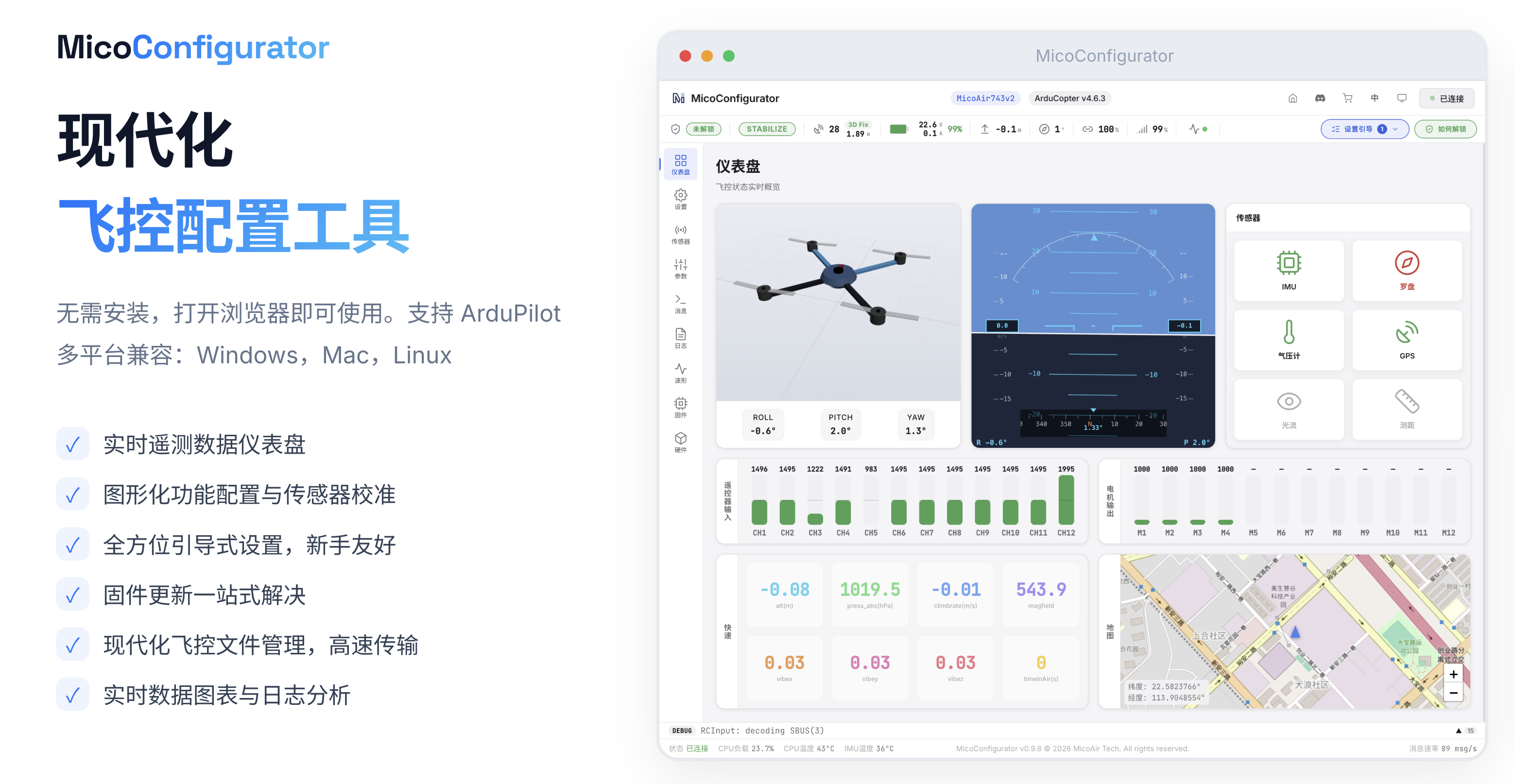
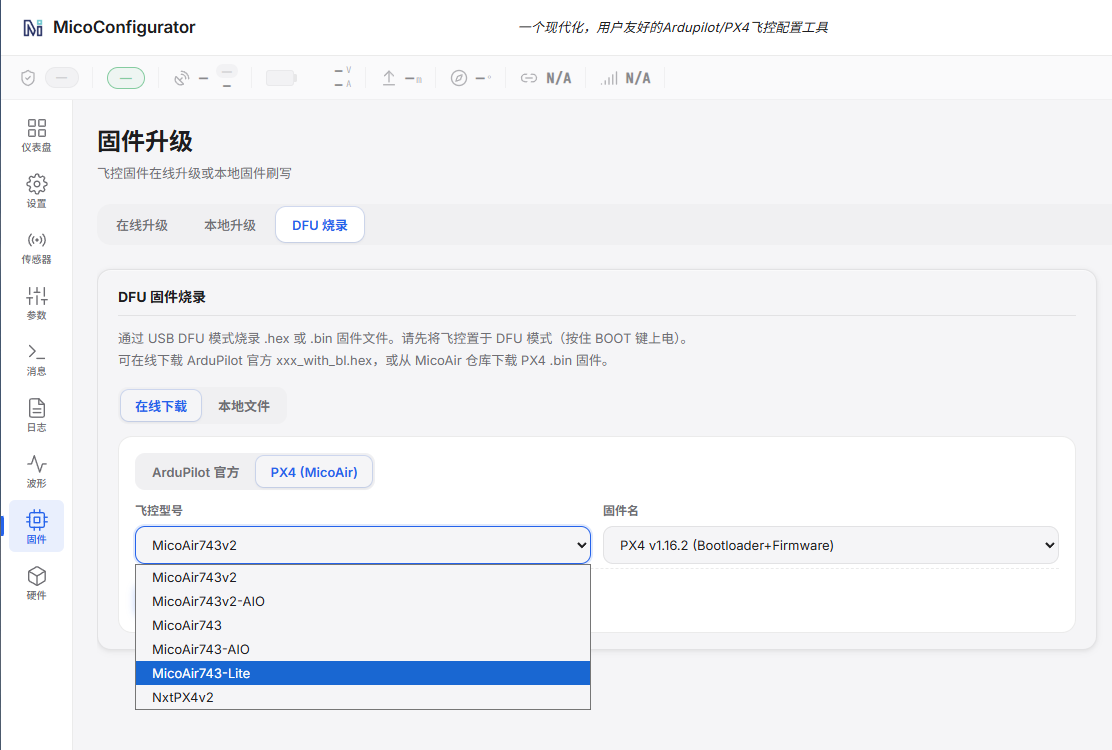
Open MicoConfigurator in Chrome or Edge. After entering DFU mode, select the model and firmware directly in the browser to complete flashing (the DFU driver must be installed on Windows).
ArduPilot
- Firmware target:
MicoAir743v2 - Included in the official hardware support list starting with ArduPilot 4.6.0
- Flight-controller firmware can be flashed online through MicoConfigurator or Mission Planner
- Official ArduPilot hardware definition
- Official ArduPilot firmware downloads
- ArduPilot Custom Firmware Builder
MicoAir743v2-AIO and MicoAir743v2 use the same firmware. When downloading or flashing firmware, select the
MicoAir743v2target. Do not select firmware for a similarly named AIO target.
PX4
- Firmware target:
micoair_h743-v2 - Included in the official hardware support list starting with PX4 1.16.0
- Official PX4 hardware definition
- PX4 releases
- PX4 firmware provided by MicoAir
Official PX4 firmware compilation guide
Compile the bootloader:
make micoair_h743-v2_bootloader
Compile the default firmware:
make micoair_h743-v2_default
INAV
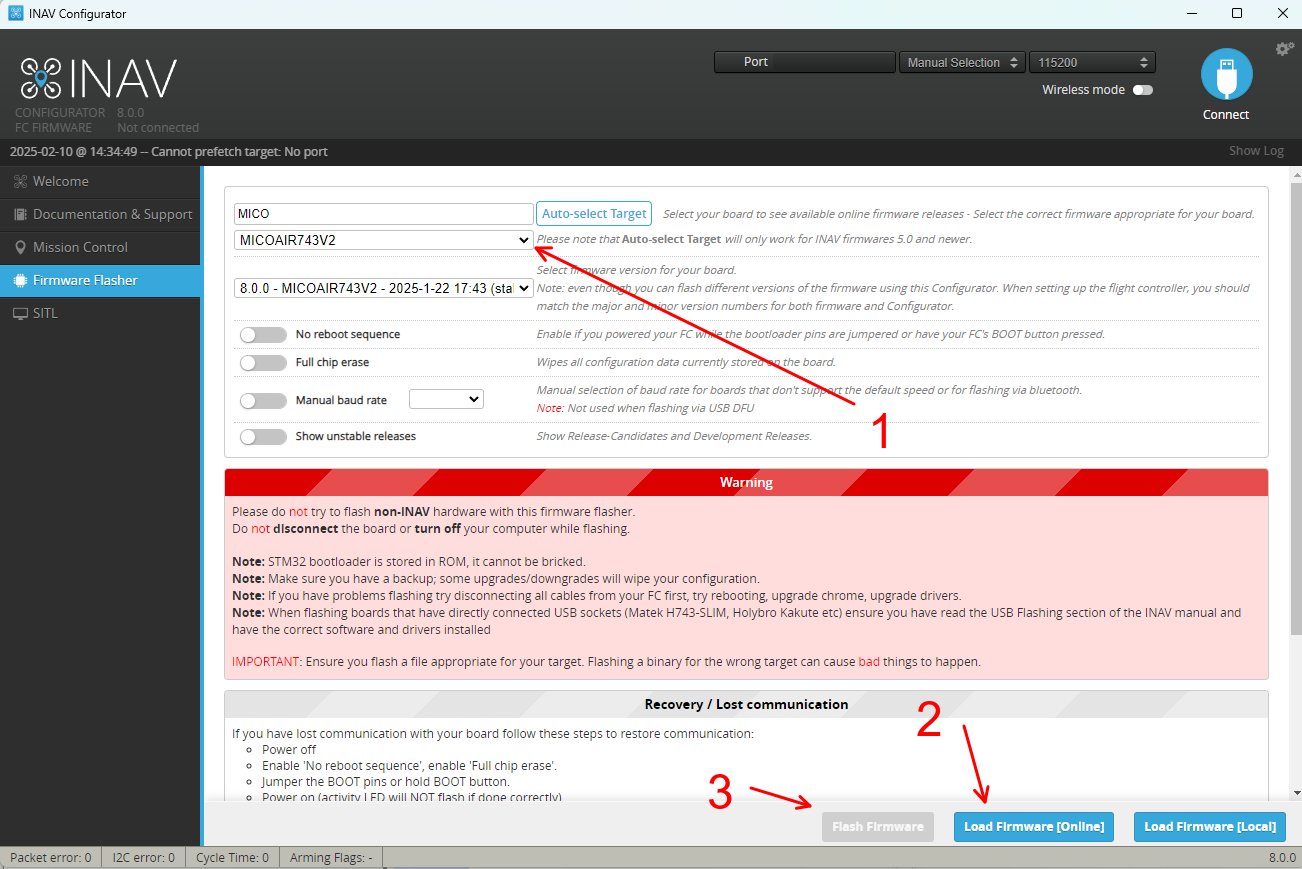
- Firmware target:
MICOAIR743V2_EXTMAG - This target is available starting with INAV 8.0.1 RC1
- MicoAir743v2 INAV firmware
Betaflight
- Use the corresponding MicoAir743v2 firmware provided in the MicoAir repository
- MicoAir743v2 Betaflight firmware
Skybrush
- ArduPilot-based drone light-show firmware
- Skybrush firmware download
Troubleshooting
USB Is Not Recognized
- Replace the USB Type-C cable with one confirmed to support data transfer.
- Avoid hubs with insufficient power; connect to a primary USB port on the computer.
- Check whether the system recognizes a serial-port or DFU device.
- If it still cannot connect, enter DFU mode using the steps above to verify the hardware connection.
No Receiver Data
- Check whether TX and RX are cross-connected.
- Connect the SBUS signal to
RX6; CRSF/ELRS normally uses bothTX6andRX6. - Verify the UART protocol and baud rate, and check whether UART6 is being used by another function.
- Confirm that the receiver supply voltage is correct and that the devices share a common ground.
Motor Does Not Rotate or Rotates in the Wrong Direction During Testing
- Remove all propellers before motor testing, and connect the propulsion battery.
- Verify the motor numbering, output protocol, and ESC power supply.
- Check that the flight controller's ESC protocol is
DShot300and that the onboard AM32 ESC configuration matches the selected protocol.
Related Resources
- MicoConfigurator
- Flight Controller Firmware Flashing Tutorial
- ArduPilot Basic Configuration Tutorial
- Connect a Computer to MicoAir H743v2/Lite over Bluetooth
- Official ArduPilot documentation
- Official PX4 documentation
- QGroundControl download
- INAV Configurator
- Betaflight Configurator
Appendix A: Pinout Table
| Function category | Device / Use | Bus / Peripheral | Signal | MCU pin |
|---|---|---|---|---|
| IMU | BMI270 | SPI3 | MOSI | PD6 |
| IMU | BMI270 | SPI3 | MISO | PB4 |
| IMU | BMI270 | SPI3 | SCLK | PB3 |
| IMU | BMI270 | GPIO | CS | PA15 |
| IMU | BMI270 | GPIO | DRDY | PB7 |
| IMU | BMI088 | SPI2 | MOSI | PC3 |
| IMU | BMI088 | SPI2 | MISO | PC2 |
| IMU | BMI088 | SPI2 | SCLK | PD3 |
| IMU | BMI088 | GPIO | GYRO_CS | PD5 |
| IMU | BMI088 | GPIO | ACCEL_CS | PD4 |
| IMU | BMI088 | GPIO | GYRO_DRDY | PC15 |
| IMU | BMI088 | GPIO | ACCEL_DRDY | PC14 |
| Barometer | SPL06 | I²C2 | SCL | PB10 |
| Barometer | SPL06 | I²C2 | SDA | PB11 |
| Barometer | SPL06 | GPIO | DRDY | PD0 |
| Motor output | PWM | TIM1 / CH4 | M1 | PE14 |
| Motor output | PWM | TIM1 / CH3 | M2 | PE13 |
| Motor output | PWM | TIM1 / CH2 | M3 | PE11 |
| Motor output | PWM | TIM1 / CH1 | M4 | PE9 |
| Motor output | PWM | TIM3 / CH4 | M5 | PB1 |
| Motor output | PWM | TIM3 / CH3 | M6 | PB0 |
| Motor output | PWM | TIM4 / CH1 | M7 | PD12 |
| Motor output | PWM | TIM4 / CH2 | M8 | PD13 |
| LED strip | PWM | TIM4 / CH3 | LED | PD14 |
| Buzzer | GPIO | — | Buzzer | PD15 |
| External oscillator | External | 8 MHz | OSC_IN | PH0 |
| External oscillator | External | 8 MHz | OSC_OUT | PH1 |
| Status LED | GPIO_OUTPUT | RED | — | PE3 |
| Status LED | GPIO_OUTPUT | BLUE | — | PE4 |
| Status LED | GPIO_OUTPUT | GREEN | — | PE2 |
| Button | — | BOOT | — | BOOT0 |
| I²C | Peripheral interface | I²C1 | SDA | PB9 |
| I²C | Peripheral interface | I²C1 | SCL | PB8 |
| UART | UART1 | UART1 | TX | PA9 |
| UART | UART1 | UART1 | RX | PA10 |
| UART | VTX-HD | UART2 | TX | PA2 |
| UART | VTX-HD | UART2 | RX | PA3 |
| UART | GPS | UART3 | TX | PD8 |
| UART | GPS | UART3 | RX | PD9 |
| UART | UART4 | UART4 | TX | PA0 |
| UART | UART4 | UART4 | RX | PA1 |
| UART | UART5 | UART5 | TX | PB6 |
| UART | UART5 | UART5 | RX | PB5 |
| UART | RCIN | UART6 | TX | PC6 |
| UART | RCIN | UART6 | RX | PC7 |
| UART | UART8 | UART8 | TX | PE1 |
| UART | UART8 | UART8 | RX | PE0 |
| USB | USB | USB | USB_DM | PA11 |
| USB | USB | USB | USB_DP | PA12 |
| SD card | microSD | SDMMC1 | D0 | PC8 |
| SD card | microSD | SDMMC1 | D1 | PC9 |
| SD card | microSD | SDMMC1 | D2 | PC10 |
| SD card | microSD | SDMMC1 | D3 | PC11 |
| SD card | microSD | SDMMC1 | CLK | PC12 |
| SD card | microSD | SDMMC1 | CMD | PD2 |
| Debug interface | SWD | SWD | SWDIO | PA13 |
| Debug interface | SWD | SWD | SWCLK | PA14 |
| Battery sensing | Approximately 1:21 voltage divider | ADC | Voltage | PC0 |
| Current sensing | Onboard current sensing | ADC | Current | PC1 |