

Docs directory
Table of contents
LR900 Telemetry Radio User Manual
Introduction
LR900 is a series of long-range telemetry radios developed, designed, and manufactured by MicoAir Tech. Operating in the 890-915MHz band, it uses LoRa spread-spectrum and FHSS frequency-hopping technologies to provide strong interference resistance and high receiver sensitivity. It supports transparent serial transmission and is compatible with mainstream open-source flight controllers and ground control station software. It can connect ArduPilot/PX4 flight controllers to ground control stations such as Mission Planner/QGC, and can also carry data between an RTK base station and rover.
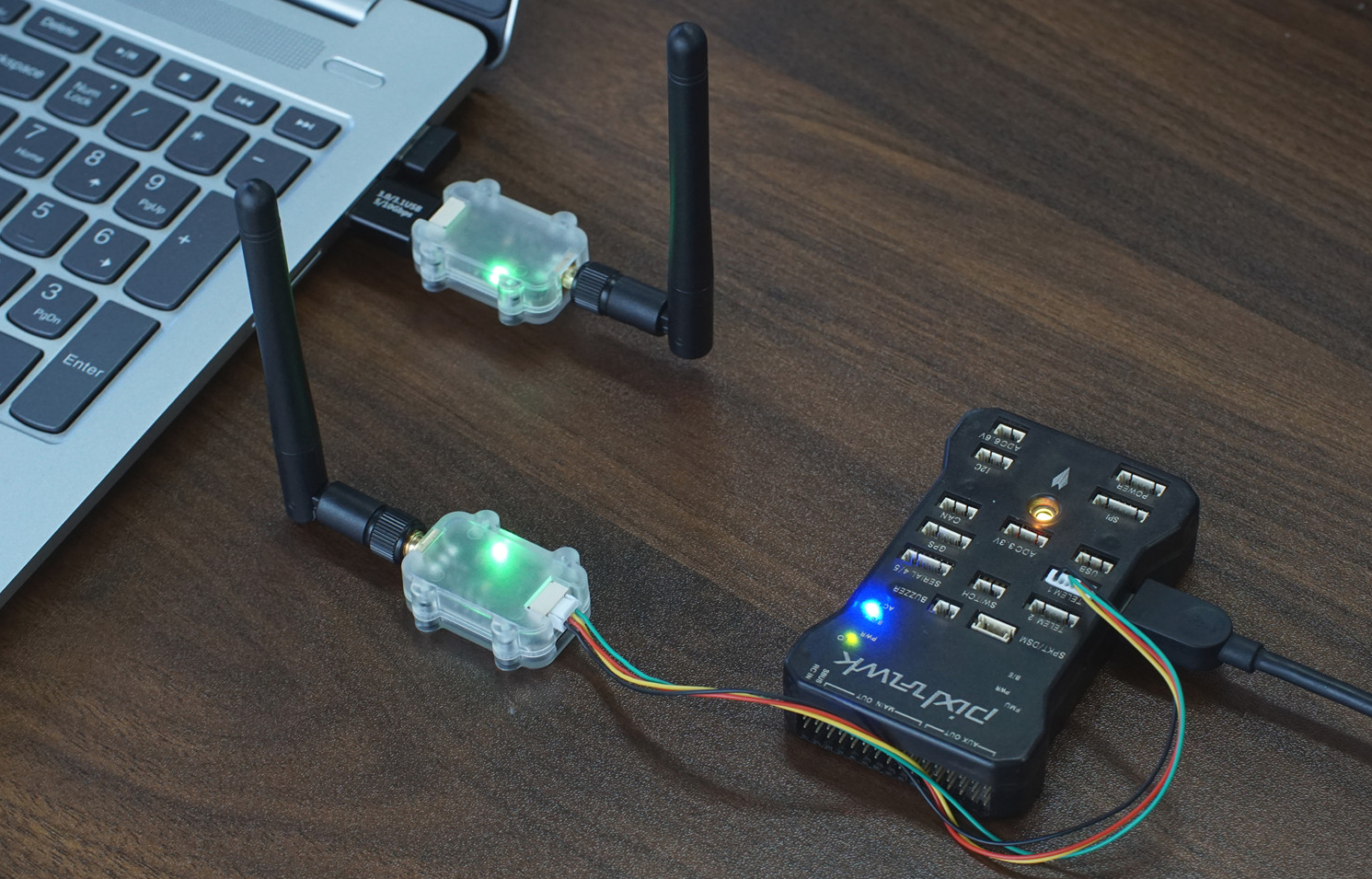
Purchase
Model Information
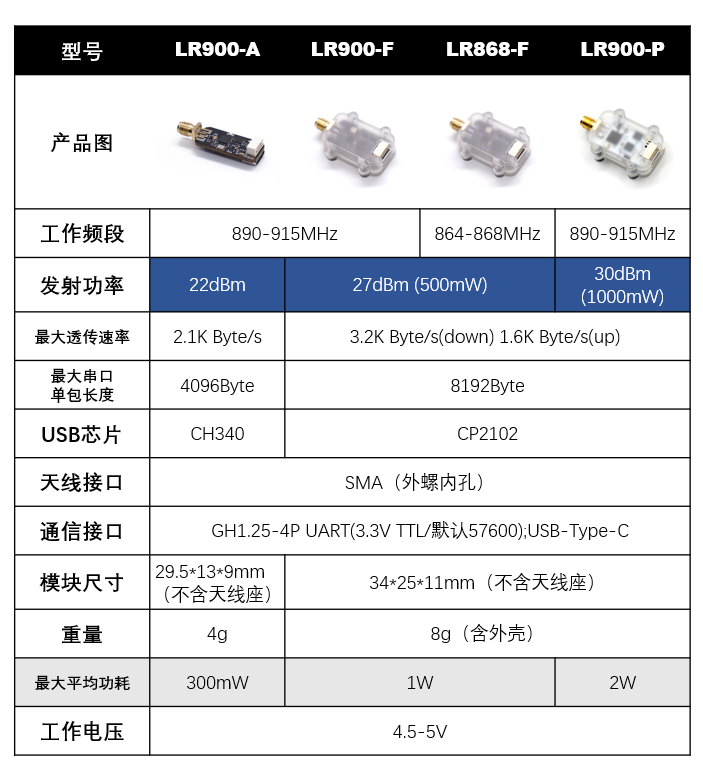
- LR900-A: Maximum transmit power 22dBm, without enclosure
- LR900-F: Maximum transmit power 27dBm
- LR900-P: Maximum transmit power 30dBm
The LR900-A uses a CH340 USB-to-TTL chip; all other models use CP2102.
The models have different transmit power levels and can all be paired with one another, but the communication range is generally determined by the lower-power radio in the link.
Specifications
-
Operating frequency band: 890-915MHz
-
Transmit power: 1000mW(LR900-P); 500mW(LR900-F); 160mW(LR900-A)
-
Maximum transparent transmission rate: 2.1 kB/s; 3.2 kB/s (FHSS downlink, not supported by LR900-A)
-
Maximum single serial packet length: 4 kB (LR900-A); 8 kB (LR900-F/P)
-
Communication interfaces: LVTTL (3.3V) serial; USB-Type-C
-
Serial baud rate: 57600 by default
-
Antenna connector: SMA (external thread, female center contact)
-
Supply voltage: 4.5-5V
-
Maximum average power consumption: 2W(LR900-P); 1W(LR900-F); 300mW(LR900-A)
Dimensions
- LR900-F/P dimensions, in mm
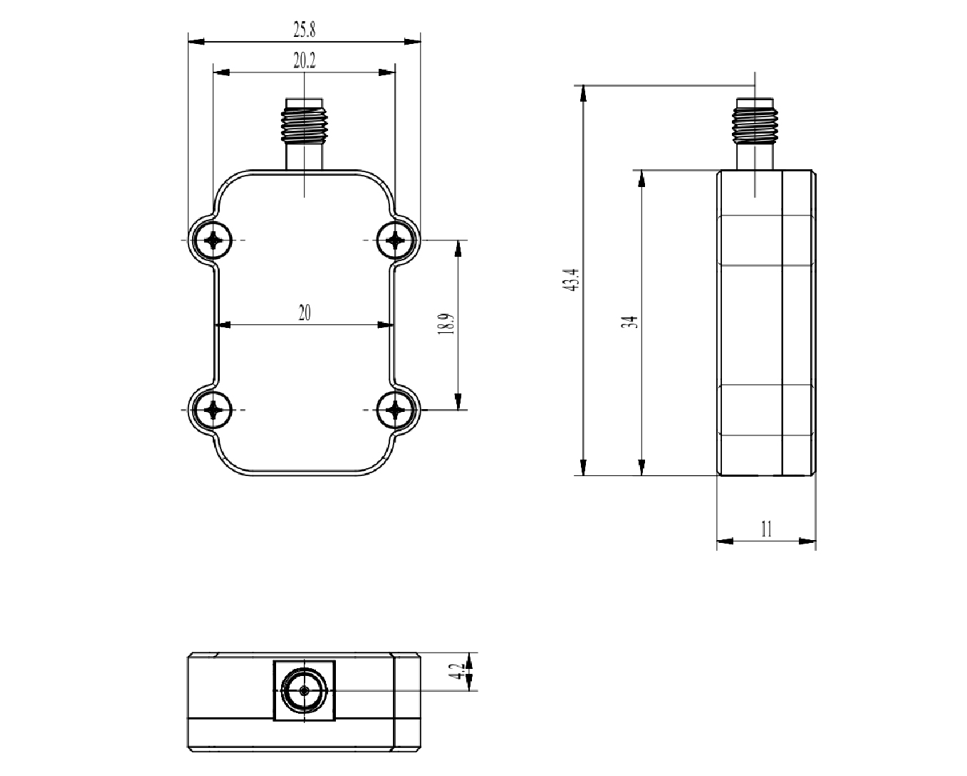
- Weight: 8g
- 3D model (STP)
Interfaces
The LR900 telemetry radio has two external interfaces:
- A 3.3V-level TTL serial interface with a GH1.25-4P connector, normally used to connect directly to a flight controller serial port.
- A USB-Type-C port for connection to a computer. The corresponding USB-to-TTL driver must be installed on the computer. Note that the USB port cannot be used to connect directly to a flight controller.
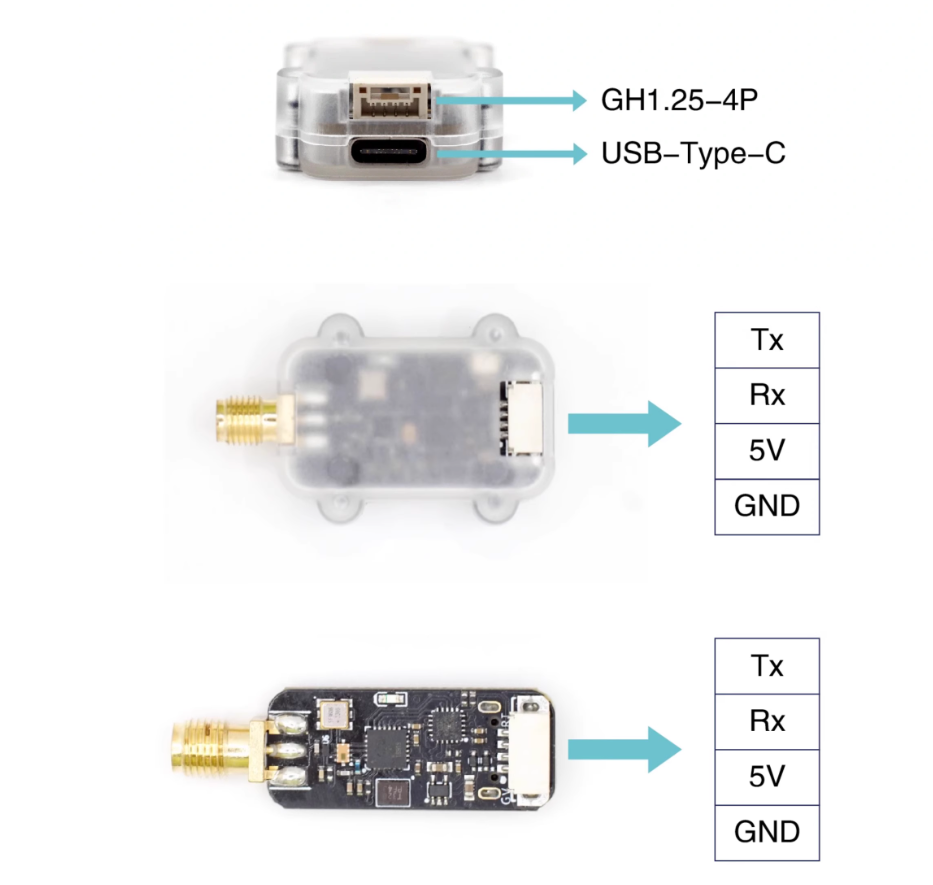
- Tx: Serial Tx; connect to the flight controller's serial Rx
- Rx: Serial Rx; connect to the flight controller's serial Tx
- 5V: 5V power input
- GND: Power GND
Configuration Software and Drivers (How to Configure Radio Parameters)
Use MicoAssistant to connect to the radio and configure its parameters: MicoAssistant download and user guide
USB-to-TTL drivers
- CH340 driver download (LR900-A)
- CP2102 driver download and installation guide (LR900-F/P)
LED Indicator
The LR900 has one green LED that primarily indicates the telemetry connection status:
- Flashing at 1Hz: Telemetry link not connected
- Solid: Telemetry radios paired and connected normally
Pairing the Telemetry Radios
Two LR900 modules automatically connect after power-up when their parameters match (all modules ship with the same default parameters). If multiple radio pairs must operate at the same time, assign a different module address to each pair. See the parameter descriptions below for details.
Telemetry Parameters
Operating Mode
The LR900 supports three operating modes: full duplex, broadcast-transmit, and broadcast-receive. Full-duplex mode is the default.
Only full-duplex mode can be used for flight controller telemetry. In broadcast-transmit or broadcast-receive mode, a radio can only transmit or receive data; these modes are generally used with RTK base stations and rovers.
Transparent Transmission Rate
The LR900 supports three rate modes. High-speed mode is the default, with equal uplink and downlink rates of 2.1 kB/s, meaning that 2.1K bytes of data can be transferred per second. Only high-speed mode is recommended when the radio is used for flight controller telemetry.
Frequency Mode
The LR900-A supports two frequency modes: manual and automatic. The LR900-F/P supports four frequency modes: manual, automatic, FHSS-GROUND, and FHSS-AIR.
Automatic mode is the default and selects the communication frequency automatically. In manual mode, the frequency parameter must be set manually.
FHSS is the frequency-hopping mode and is recommended for flight controller telemetry. Configure the radio connected to the flight controller as FHSS-AIR and the radio connected to the computer as FHSS-GROUND. In FHSS mode, the downlink rate (flight controller to computer) is higher and can reach 3.2 kB/s. Note that the LR900-A does not support FHSS mode.
Communication Frequency
This parameter is effective only in manual frequency mode.
Values 0-25 correspond to 890-915MHz.
Module Address
The default value is 1000. Two modules can communicate only when their address parameters match. When using multiple telemetry pairs simultaneously, assign each pair a different value in the range 1-30000.
Serial Baud Rate
Baud rate of the GH1.25 interface. Supported values are 9600/19200/38400/57600/115200; the default is 57600.
USB Baud Rate
Baud rate of the USB-Type-C interface. Supported values are 57600/115200; the default is 57600.